Question about command line installation

Status
Not open for further replies.

Oliver Broad

Free User
Joined
Feb 24, 2020
Messages
119
Reaction score
12
What is the correct answer to "Enter your local internal FQDN"? I have control of DNS, so I can use the same FQDN for internal and external, and I don't believe the web configurator asks the question because it isn't in instructions. Should I just give it as ---.3cx.co.uk or just --- or blank and the installer auto-fills?

Code:
Do you have a DNS Server that you can manage?
(1) Press 1 if you have a local DNS Server in your control with the ability to create A records. Example Microsoft DNS
(2) Press 2 if you do NOT have a local DNS that you can manage - The Local IP Address will be used in this case. If your DNS is inside your router, then you need to select this option because most router DNS's are unmanaged.
Enter option: 1


Enter your local internal FQDN. Example pbx.company.local. Go to your DNS Server and add an A RECORD pointing to -.-.-.-
Internal FQDN: ------.3cx.co.uk.
 
I always use the 3CX FQDN. That way, no matter where my install is (local or cloud) I can have it point to FQDN. Even if it's internal I can set up the zone for FQDN and point them to local IP.
 
  • Like
Reactions: JohnS_3CX
OK I'm probably over-complicating this. I'm using the 3cx supplied FQDN not my own domain, and I'm using a Draytek router that can be programmed to return the internal IP in response to the DNS query, so I believe that is effectively split DNS? As I understand it if I was using the web configurator I wouldn't even be asked.

Since I'm using 3CX's FQDN the installer already knows what it is, but when I sent myself a welcome email it showed the local IP first, suggesting I've configured it wrong because sending a HTTPS URL with a numeric IP is pretty much a last resort and should not happen.
 
Use single DNS.

Point your 3CX FQDN to your local IP on the draytek and external lookup of the FQDN will point to the 3CX WAN IP.
 
If you have a specific use scenario then you can go for Split DNS with option A. If you do not then select 1 and use the local IP address. It will be less complicated.
 
hello everybody,

need help with my FQDN. As of now when i ping my fqdn it response with different ip address instead of my wan ip address. Please advise

thanks
 
hello everybody,

need help with my FQDN. As of now when i ping my fqdn it response with different ip address instead of my wan ip address. Please advise

thanks
I would recommend creating a new thread for your issue and not take over this one. Also provide some more details regarding your installation and issue
 
Update: I looked a little more closely at the "Extension" settings and under "Provisioning" there is an option to provision by IP or by FQDN. If I set it to FQDN before sending the welcome email it gives the domain like I'd expect, and not the IP. Looks like I need to set this every time I configure an extension.

Also as a polite request to anyone writing instructions or help please give clear unambiguous examples. The FQDN example ends in a full stop. It happens to be at the end of a sentance. Now in some settings (DNS) a full stop is needed to prevent another domain being appended, but more often it shouldn't be.

Another example is "Main trunk No.". This appears to be the full international number but minus the international prefix, not sure whether it should start 44, 0044 or +44 though.
 
Last edited:
Update: I looked a little more closely at the "Extension" settings and under "Provisioning" there is an option to provision by IP or by FQDN. If I set it to FQDN before sending the welcome email it gives the domain like I'd expect, and not the IP. Looks like I need to set this every time I configure an extension.

Also as a polite request to anyone writing instructions or help please give clear unambiguous examples. The FQDN example ends in a full stop. It happens to be at the end of a sentance. Now in some settings (DNS) a full stop is needed to prevent another domain being appended, but more often it shouldn't be.

Another example is "Main trunk No.". This appears to be the full international number but minus the international prefix, not sure whether it should start 44, 0044 or +44 though.

After provisioning an app, it will download settings for both local IP and FQDN so both ends are covered.

As for trunk number, this depends on you provider and how they want/like numbers to be formatted as. The PBX will comply accordingly (and there are also E164 settings that help you manage the number formatting).
 
OK point taken about number format being provider dependant.

Regarding the FQDN by default the welcome email leads with a numeric HTTPS URL and clicking it causes the browser to throw a fit. If I change the switch then the email leads with the FQDN login URL and clicking it works as it should.

FWIW the provider is Gamma, but we're getting it via a reseller.
 
If you select the FQDN it only includes the FQDN.

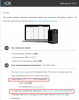
If you select the IP, the email will contain both and inform you accordingly:

1585147988096.png

Depending on your type of installation (cloud or on-premise) some people will need to connect via IP and some via FQDN. There are a lot of firewalls that are set to refuse the hairpin traffic if you use the FQDN to connect from within your office, on an on-premise instance that is behind the same firewall. Those people need to connect via IP or the admin must setup a split DNS to route the FQDN back to the internal server so the traffic doesn't go out and back in. Having the both IP and FQDN though will increase your chances of accessing the system no matter what the case.
 
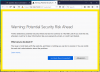
warning2.png
Do you see my problem. If I go with numeric this is likely to be the first thing my boss will see when trying to log in. OK I get that some people are stuck with this, as some routers can't do "hairpin", or can only do it if the 3CX server is in DMZ as the router can't apply two NAT rules to the same packet.

If someone is stuck with having to use IP for local then using http not https might be preferable.
 
Last edited:
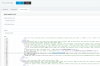
Yes I see. You may edit the email templates the PBX sends to only contain the public URL
1585150209734.png
 
As a "feature request" or "bug report" could the following things happen:

1: Please look into the behavior of the installer. Particularly the command line one, as I'm guessing the web based installer behaves more consistently. I've looked at the invite emails sent during my earlier trials and there is inconsistancy. On one previous trial it did go by FQDN, so it is possible without template hacking.
2: Please look at HTTP vs HTPS behavior. There are two possibly minor issues. One is that HTTPS and numeric addresses really don't mix. The other is that a HTTP to HTTPS redirect doesn't seem to work with non-standard ports, and might need to be replaced with a "click here to redirect" page.
3: PLEASE perform a miscue analysis on your email template. I can't say exactly what's wrong but it seems to trigger extreme confusion in some users. Also surely the QR code should appear inline in the email not just as an attachment.
4: Please add a simple box to allow customization of emails. This would not be a full rewrite of the template, just a placeholder for a company logo and intro message to say "yes it really is from us".
 
Status
Not open for further replies.