Questions About Update 6 Future Requirements

Status
Not open for further replies.

GDInc

Customer
Joined
Apr 9, 2018
Messages
30
Reaction score
6
Future Requirements for On Premise Installs
In future, on premise installations will require a dedicated IP and a split DNS server setup. Please obtain a manageable DNS server or a dedicated IP. Alternatively, move to 3CX Hosted.

I have a couple questions:

First, are these requirements applicable if all of our phone system is internal? We do not have any external users, nor do we use any of the 3CX Apps externally. All 3CX usage is internal and we have no open ports.

Second, if these requirements still apply to us, it says a dedicated IP AND a split DNS is required. Second it says a manageable DNS OR a dedicated IP. Unless I'm misunderstanding, it kind of contradicts itself. Are BOTH an dedicated IP and split DNS required?
 
Im going to assume that the split DNS requirement is because when you provision a phone in LAN mode, you can only use the FQDN which in your case will be pointing to external IP example.3cx.co.uk.

what DNS server do you have? Just follow 3CX instructions to create a zone. Some routers also allow this otherwise.

https://www.3cx.com/docs/creating-fqdn-split-dns/

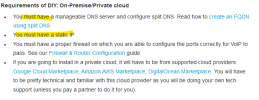
the 3CX must have a static IP AND split DNS. They're both seperate things.
 
  • Like
Reactions: N_G
Not an expert but I'm reading that the "or" is a mistake, but if the system is purely internal then the public IP might not be important unless it turns out to be required for license activation.

Split DNS is trickier, but simply you need to be able to give the 3CX server a name that resolves to the correct IP.
In my case I use a Draytek router which has a feature called LAN DNS which allows it to intercept specific DNS requests and return a local IP instead of the public one. Outside my LAN a DNS query returns the public IP.

Other routers may implement a DNS proxy providing similar functionality. Otherwise you basically just implement your own DNS server that is only visible on your LAN.

It MIGHT be possible to give the local IP address as a FQDN, which would totally break external use but for an internal only system it might be tolerable.

If all your clients are computers not IP phones you might be able to use "HOSTS" file entries instead of DNS. This would break external use but again intenal only.
 
  • Like
Reactions: Evolute IT
Im going to assume that the split DNS requirement is because when you provision a phone in LAN mode, you can only use the FQDN which in your case will be pointing to external IP example.3cx.co.uk.

what DNS server do you have? Just follow 3CX instructions to create a zone. Some routers also allow this otherwise.

https://www.3cx.com/docs/creating-fqdn-split-dns/

the 3CX must have a static IP AND split DNS. They're both seperate things.
So, taking this a step further, this implies that 3CX will purposely be hiding the private IP of the NIC interface from the provisioning tab on the premise based platforms so that it can only discover same by using the split-dns that resolves to the private IP anyway. Notwithstanding that one could still presumably manually provision devices to get around the limitation, I am struggling to understand how this benefits anyone using a premise based system.

Additionally, while I always use a static public IP, not everyone across the globe may be able to acquire a static IP. is this not also a reason for the FQDN? Yes, I understand the resolution time based upon the license type, but at least its an option.

Maybe I am being cynical, but it seems to be more of an effort to push folks to the 3CX hosted platform than anything else. Like the OP, I am confused with how the notice is written. And and the Or are not equals. One indicates that both must be had, the other indicates that one or the other, but not both is needed.
 
  • Like
Reactions: ClaudioBassani
Where is the source this is extracted from?

https://www.3cx.com/docs/manual/install/

States you MUST have DNS and you MUST have a static IP

1676036916331.png
Maybe the move is to neaten things up?

Before users would have 2 links for web client and one would give a certificate warning.
 
Based on other posts here I'd expect they will be using HTTPS more on phones and therefore the LAN IP is not going to be a valid cert match.
 
Im going to assume that the split DNS requirement is because when you provision a phone in LAN mode, you can only use the FQDN which in your case will be pointing to external IP example.3cx.co.uk.

what DNS server do you have? Just follow 3CX instructions to create a zone. Some routers also allow this otherwise.

https://www.3cx.com/docs/creating-fqdn-split-dns/

the 3CX must have a static IP AND split DNS. They're both seperate things.
Thanks for the info. We are using Window Server internally for our DNS and it does look simple to set up.

So, to dumb it down (for myself), basically setting up a split DNS will allow internal phones to resolve to the internal IP address of the 3CX server rather than the external IP of ourserver.3cx.us when provisioning, correct?
 
setting up a split DNS will allow internal phones to resolve to the internal IP address of the 3CX server rather than the external IP of ourserver.3cx.us
Correct.
 
Feature request: Please include an optional DNS proxy and possibly DHCP server as well. This would give a simple way to get a small LAN working. Having 3CX supply DHCP would be the quickest way to push the DNS configuration.

Another method that might be an alternative to split DNS, provided the 3CX server is fully secured, is to use a router DMZ configuration instead of port forwarding. Experimenting with HTTP servers some years ago I found that the router we had would route from the LAN to the HTTP server in DMZ mode, but not port forwarding.

Not sure I'd want to try that with 3CX on Windows though.
 
I wanted something that would work on a Windows box so I went for Acrylic DNS proxy. Turns out I can use the router's DHCP function to push my server's IP so that seems to work fine.

Note there's a tiny bit of configuration to allow it to serve your LAN, by default it only serves to localhost.
 
Interesting sidenote: It looks as if the BT Business hub (can't remember which version) includes split DNS out of the box, but on the downside it seems as if the only way to stop it remapping port numbers is to use DMZ for the server, which opens up a can of worms regarding security.
 
Status
Not open for further replies.

Forum statistics

Threads
111,974
Messages
590,081
Members
164,899
Latest member
mazet