Solved Queue manager cannot login/logout agents

Status
Not open for further replies.

bit101

Silver Partner
Basic Certified
Joined
Sep 8, 2020
Messages
179
Reaction score
34
Hi togehter,

we have faced the issue that it is not possible in the new Windows desktop client (V18) to login or logout agents to a queue as queue manager. This worked with Version 16 of 3CX. So is this a bug or what is the correct way to reach this?

regards
 
Hi @bit101,

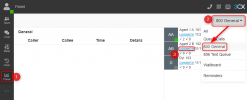
If you open the Desktop App, click Panel then select your queue. From there you should be able to log agents in and out if you are the queue manager.

1637571051604.png

Let me know if you're unable to log agents out for any reason.
 
Hi @bit101,

If you open the Desktop App, click Panel then select your queue. From there you should be able to log agents in and out if you are the queue manager.

View attachment 26018

Let me know if you're unable to log agents out for any reason.
Hi!
this is excatly what we have tried: It shows that the user is logged in or logged out but a real the user is always logged in or logged of in the queue. When you logged into the agent webinterface you can see that.
 
Hi @bit101,

but a real the user is always logged in of logged in the queue. When you logged into the agent webinterface you can see that.
Can you show me what you mean by this with a screenshot?
 
That is very easy:
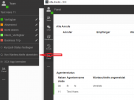
As queue manager i have the user Test logout out from the Queue. But the user "Hans Test" can see in his webinterface that he is still loged in:

Queue manager
3cx_queue1.PNG

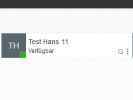
webinterface from Hans Test. The "Q" is already displayed:
3cx_queue2.PNG
 
Hi @bit101,

Yes, I see what you're saying. When you explicitly log an extension out of all of the queues, it still shows the extension logged in to a queue. If the extension logs itself out of the queues globally, it removes the Q icon.

This is because the Q icon is tied to the global logout only. Even if you explicitly log an agent out of all of the queues, the Q icon stays, because it has not been globally logged out.

The best bet is to keep an eye on the Panel view, this will tell you what queues the extension is logged into and if it is blank, then it won't be polled in those queues even if it has the Q icon next to its name in the Team view.
 
Hi @bit101,

Yes, I see what you're saying. When you explicitly log an extension out of all of the queues, it still shows the extension logged in to a queue. If the extension logs itself out of the queues globally, it removes the Q icon.

This is because the Q icon is tied to the global logout only. Even if you explicitly log an agent out of all of the queues, the Q icon stays, because it has not been globally logged out.

The best bet is to keep an eye on the Panel view, this will tell you what queues the extension is logged into and if it is blank, then it won't be polled in those queues even if it has the Q icon next to its name in the Team view.
Hi Vasilis,

the thing is that we have only one queue here so that it should work then and the "Q" should be disappear.
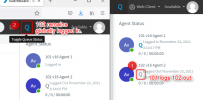
The next Problem is that if we logged out the agent "Hans Test" that he get the status he is still logged in:

3cx_queue3.PNG

So here it has to show that he can logged in again but it shows he can logged out what he is already.
For my opinion this is a bug in 3CX because as i said: In Version 16 it worked fine
 
Hi @bit101,

Again, the above can happen if the queue manager has explicitly logged the extension out, it doesn't mean that globally (from the menu as shown).

What needs to be realized by this conversation is that Global login/out is not connected to the explicit login/out.

For my opinion this is a bug in 3CX because as i said: In Version 16 it worked fine
In v16 it works the exact same way:

1637586987201.png

Explicitly logged out, but Globally logged in.
 
Okay this is very confusing for the agents because he can see the "Q" that means he is logged into a queue. And it is thus confirmed that he see in his profile that the link is displayed "Logout from queue". So only to see via the switchboard is of course confusing!
 
Hi again @bit101,

I understand that it can be confusing, but there is a logical flow to this...
  1. If the agent wants to be logged out, they can log themselves out globally. They then know that they won't be called via the queue or receive any chats via the queue.
  2. If the agent is meant to be taking chats / calls, they will be logged in globally, they'll be expecting chats / calls.
  3. If the agent is meant to be taking chats and the manager logs them out, they will not be polled or receive any chats / calls however they won't need to worry much about this since they know they're supposed to receive them.
Hope that makes more sense.
 
  • Like
Reactions: Evolute IT
Hi Vasilis,

thanks for that and i understand you explanation.
But we have customers here in germany that wants to have dynamically the central number of the company that is a queue. So agent A has the central form 08 - 10am, agent B has the central von 10 - 12am. When the agent forget to logout of the queue the queue manager can logout the agent. Confusing is that the "Q" is still displayed even if they has only one queue. So it is very confusing for the customer because most of them has one queue.
Therefore i stick with it. That behavior is confusing and should be changed. Maybe you can discussed that with your dev team.

thanks & regards
 
Thanks @bit101, will look into it.
 
Status
Not open for further replies.

Forum statistics

Threads
112,025
Messages
590,368
Members
164,978
Latest member
FringeIT-Eric