- Joined
- Feb 11, 2022
- Messages
- 3
- Reaction score
- 0
Hi all
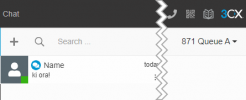
I am very new to this community and have been searching/reading for the past few days on an issue I seem to be hung up on. Call queue managers are not able to see the "monitor" option in the Chats section of the web client. The only options available in the queue are "Recent", "Archive", and "Call Queue Name". The Call Queue option results in only seeing the manager's chats, not all the agents chats in the queue.
I have verified that I am a manager on the call queue, auto-assign is disabled, and chat logs are enabled. I can also see the SMS messages from the admin console when going to Chat Logs. I understand managers would only see chats that started as inbound SMS to the queue, which I verified there are some in the chat logs. However, I am unable to see the "Monitor" option for chats or any agent chats.
Any ideas of where to look?
Thanks in advance!
I am very new to this community and have been searching/reading for the past few days on an issue I seem to be hung up on. Call queue managers are not able to see the "monitor" option in the Chats section of the web client. The only options available in the queue are "Recent", "Archive", and "Call Queue Name". The Call Queue option results in only seeing the manager's chats, not all the agents chats in the queue.
I have verified that I am a manager on the call queue, auto-assign is disabled, and chat logs are enabled. I can also see the SMS messages from the admin console when going to Chat Logs. I understand managers would only see chats that started as inbound SMS to the queue, which I verified there are some in the chat logs. However, I am unable to see the "Monitor" option for chats or any agent chats.
Any ideas of where to look?
Thanks in advance!