Quick Question

Status
Not open for further replies.

sfriday022

Free User
Joined
Jul 20, 2021
Messages
17
Reaction score
0
After initial install, where are admin credentials stored in the instance database?
In other words if you change the admin credentials from webadmin_X to userX its no longer in the phone system database.
 
I want to have more than one administrator so it looks like I need to do a manual insert.
 
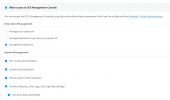
With 3CX there is only one main administrator account but you can in fact provide Management Console access to an extension and give them full rights:

1642408567414.png


This can be done in "Users/Extensions >> Edit >> Rights".

Note: Do bear in mind that accessing the database is under no circumstances recommended by 3CX and WILL render the 3CX instance at hand an unsupported configuration.
 
no here is the issue I am running Version 14 on IIS, because running 24 VMs versus 24 websites is a very big difference in capital/opex cost. but if you change the webadmin password its not updated in the phonesystem table as it should be. I assume its written somewhere in the instance databases or your cloud but I cant find it. I have been doing testing for over six months and have two production instances(my first two) which I dont know the webadmin password which I reset in August(while my extensions and phones work)... so I went to review the initial configs in the phonesystem customer dbs to try those and they didnt work obviously because I had changed them.
 
and for the record I believe that any new console users should be added to the phonesystem customer database and you could even charge for that service as most management utilities do...right now the initial password is included in the customer table, but if you change it in the app, then it doesnt update it? Thats either a bug, or you are writing it somewhere else.
 
right now the initial password is included in the customer table, but if you change it in the app, then it doesnt update it
Well v14 is not supported anymore so I'm afraid that even if that's the case it not something that will ever change. My recommendation would of course be to upgrade the PBX to the latest version which currently is v18.0.2.314.

Regarding the credentials, all I can recommend is that, if you happen to have a 3CX backup file somewhere you could check the .xml file in it. If I'm not mistaken the Management Console admin credentials should be in there.
 
  • Like
Reactions: Evolute IT
Or if there was a way to reset an instance's webadmin password from the 3cx virtual manager that would work as well but it doesnt appear you can.
 
Do you have a backup? Have you tried finding it from there?
 
ok well the webadmin password is not written in the tables that I can find for the instance, and its not in the .ini file unless its written into a hash, it may be on the 3cx website for the license associated with the instance....but yes I can delete the instance and restore the relevant tables... but that seems absurd...

Note my frustration. And yes I can change these rights of an individual user if I can get into the webamin tool to begin with so thanks for those directions.

Anyway... in the future my recommendation to you all is to simply have your developers write out any console users to the phonesystem.customers table so that you can view them, and add another maintenance screen for that process either on the 3cx portal, or on the phonesystem itself (unless you want to stay on the SMB marketplace).
 
At the last very large company I worked we had like 500 regional PBX administrators which had very different rights across the enterprise.
 
Status
Not open for further replies.

Forum statistics

Threads
111,974
Messages
590,083
Members
164,901
Latest member
Silent_Guru