- Joined
- Nov 13, 2020
- Messages
- 56
- Reaction score
- 15
Hy,
Since Upgrade to V18 last week we are facing issues with 3CX Webmeeting. We use QuickMeeting/Click2Meet most of the times.
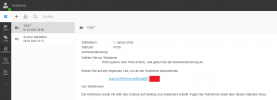
Users report the problem that they get the error "Meeting Has Not Started Yet. Please Try Again Later" although the host of the meeting told me he is in the meeting and other users are connected?!
The users are using Iphones the host uses the webclient on a windows 10 laptop.
The issue happened last Thursday 27.8. and yesterday 3.9. in the morning.
The users report that they can join another scheduled meeting (which has option "Meeting starts once organizer joins" disabled)
So I don't think its a network/firewall issue.
I can share the meeting links and also have the verbose webmeeting logs
Since Upgrade to V18 last week we are facing issues with 3CX Webmeeting. We use QuickMeeting/Click2Meet most of the times.
Users report the problem that they get the error "Meeting Has Not Started Yet. Please Try Again Later" although the host of the meeting told me he is in the meeting and other users are connected?!
The users are using Iphones the host uses the webclient on a windows 10 laptop.
The issue happened last Thursday 27.8. and yesterday 3.9. in the morning.
- 3CX Version: Enterprise Annual 18.0.1880
- Server OS Debian 10
- Is the 3CX Server Hosted and where? on prem
- IP Phone none
- Provisioning Method: na
- Trunk Provider or Gateway Make/Model : multiple
- Has the Firewall Checker passed: YES
- Are custom Phone Templates being used: na
The users report that they can join another scheduled meeting (which has option "Meeting starts once organizer joins" disabled)
So I don't think its a network/firewall issue.
I can share the meeting links and also have the verbose webmeeting logs