


- Joined
- Nov 23, 2020
- Messages
- 104
- Reaction score
- 22
Hello gentlemen,
What a wierd puzzle I've got. Played today with the replacement SBC instance, Raspbian-powered one: restored the backup image to memory card, booted up the device and suddenly realized it doesn't accept the password as I use tty1 physical console. So I ssh'ed SBC and logged in successfuly using pretty the same password. A bit later I realized that culprit is probably # sign which appears in password - for some reason, tty1 input interprets Shift-3 shortcut from physical keyboard as £ (pound) sign.
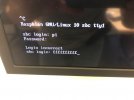
Could someone explain me what happens and how could it be fixed? Is there a way to enter # on tty1?
Just in case, here's the localectl status output:
System Locale: LANG=en_GB.UTF-8
VC Keymap: n/a
X11 Layout: gb
X11 Model: pc105
I know I am supposed to add SBC version as well, but don't know how retrieve the one via CLI. Suggestions?
What a wierd puzzle I've got. Played today with the replacement SBC instance, Raspbian-powered one: restored the backup image to memory card, booted up the device and suddenly realized it doesn't accept the password as I use tty1 physical console. So I ssh'ed SBC and logged in successfuly using pretty the same password. A bit later I realized that culprit is probably # sign which appears in password - for some reason, tty1 input interprets Shift-3 shortcut from physical keyboard as £ (pound) sign.
Could someone explain me what happens and how could it be fixed? Is there a way to enter # on tty1?
Just in case, here's the localectl status output:
System Locale: LANG=en_GB.UTF-8
VC Keymap: n/a
X11 Layout: gb
X11 Model: pc105
I know I am supposed to add SBC version as well, but don't know how retrieve the one via CLI. Suggestions?


