


- Joined
- Sep 4, 2019
- Messages
- 26
- Reaction score
- 8
I just upgraded on Windows Server from 3cx V18 to V20. It was a terrifying experience to uninstall and reinstall with no option to back out after the key is upgraded, but it happily went perfectly. The one thing that is a little confusing is the M365 integration. We use it only for SSO, so I had V18 set up with the "Sync Only These Accounts" option and I manually selected everyone who needed to sync up. After the upgrade, the M365 sync settings screen looks like this.
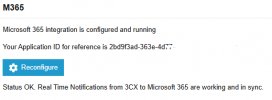
and there's a Department called Azure AD that all the accounts that I manually selected before are in. SSO still works correctly, so we're good for right now.
If I hit the Reconfigure button and go through the steps, will it try to sync all my users again? We have about 1,000 and only 100 of them have phones, so this would be a disaster. Or is there a step in the process to sync only the selected users and select them again? I'm not seeing much documentation on fixing the connector after the upgrade.
and there's a Department called Azure AD that all the accounts that I manually selected before are in. SSO still works correctly, so we're good for right now.
If I hit the Reconfigure button and go through the steps, will it try to sync all my users again? We have about 1,000 and only 100 of them have phones, so this would be a disaster. Or is there a step in the process to sync only the selected users and select them again? I'm not seeing much documentation on fixing the connector after the upgrade.


