- Joined
- Jul 7, 2010
- Messages
- 61
- Reaction score
- 9
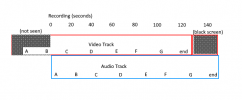
I have a client with users using 3CX Video Conferencing screen sharing to record themselves doing basic how-to videos of a few minutes in length. This has been working OK, but for one user - when she records the webinar, her audio and video are out of sync. She shares her screen (entire screen), presses record, minimizes the screen, and starts performing her task while talking her way through it. When the recording of the conference arrives, it is as if the audio recording starts instantly but the video is about 25 seconds (at least on one 2-minute recording I watched) ahead of the audio, with the first 25-ish seconds of the video missing - toward the end, the video shows the user ending the meeting, then the screen goes black, but the audio continues until the end.
For example:
Audio: "Open your browser, log into the website, then click on the Hoopty Hoop link. The page will load, click Start. A silly picture of a bear will appear. Start clicking on this picture of a bear. If you click the bear for 5 seconds, it turns red. Click click click click click...there, see the bear turned red. Now it will start dancing. See, isn't that fun! After a few more seconds, his head will explode and candy will rain down. Count the pieces of candy and put it in your spreadsheet." (end audio)
Video: (shows red bear, shows bear dancing, head explodes and candy rains down, shows user clicking "end meeting", screen goes black...and is black for about 20 seconds until the audio ends).
Hopefully that makes sense and someone can let me know what to look for to troubleshoot.
This is in Google Chrome.
For example:
Audio: "Open your browser, log into the website, then click on the Hoopty Hoop link. The page will load, click Start. A silly picture of a bear will appear. Start clicking on this picture of a bear. If you click the bear for 5 seconds, it turns red. Click click click click click...there, see the bear turned red. Now it will start dancing. See, isn't that fun! After a few more seconds, his head will explode and candy will rain down. Count the pieces of candy and put it in your spreadsheet." (end audio)
Video: (shows red bear, shows bear dancing, head explodes and candy rains down, shows user clicking "end meeting", screen goes black...and is black for about 20 seconds until the audio ends).
Hopefully that makes sense and someone can let me know what to look for to troubleshoot.
This is in Google Chrome.