


- Joined
- Nov 25, 2020
- Messages
- 19
- Reaction score
- 2
Dear 3CX Communtiy,
We have about 100 users on DECT handsets (SNOM M70 and M80) with 10 DECT antennas (SNOM M900). This works fine.
Most of our users use the 3CX App (Windows) in CTI mode to quickly find and call/forward/... other users. Some use it as a deskphone as well.
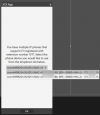
Every now and often the App pops up stating the following prompt. In this case it shows two antennas, but sometimes it could be more then two.
When selecting one of the antennas and pressing OK, everything works fine. However the prompt is annoying for end users.
Is there a way to stop this from happening?
We have about 100 users on DECT handsets (SNOM M70 and M80) with 10 DECT antennas (SNOM M900). This works fine.
Most of our users use the 3CX App (Windows) in CTI mode to quickly find and call/forward/... other users. Some use it as a deskphone as well.
Every now and often the App pops up stating the following prompt. In this case it shows two antennas, but sometimes it could be more then two.
When selecting one of the antennas and pressing OK, everything works fine. However the prompt is annoying for end users.
Is there a way to stop this from happening?


