Remote extension don't have audio when calling with a SIP Trunk

Gurei123

SMB User
Advanced Certified
Joined
Feb 28, 2018
Messages
86
Reaction score
6
Hi all.
I have a single on-prem 3CX at HQ with remote extensions at branches that connect over VPN tunnels. Remote extensions could make calls to PSTN using ISDN E1 PRI trunk on 3CX at HQ with perfect audio.
I recently replaced replaced the ISDN E1 PRI trunk with a SIP trunk. Extension at HQ can make calls to SIP Provider with perfect audio however remote extensions at the branch have no audio when the call SIP Provider. What work around can i do for the remote extensions to get audio for SIP calls to Provider? I have 10 branches with 5 phones each. Note that everything was perfect when PRI was being used.
 
Hello,

Add an SBC to each remote location, that would be the simplest and most reliable fix - you can let them connect directly to the PBX, no need for them to go via VPN.

Beyond that, you will need to examine your network design and see what's been blocked and where. Do you have an SBC at HQ? Were all phones set to connect via this SBC after the change? What phones are you using? Are they supported and running the latest firmware?

Best,
Ks.
 
Hello,

Add an SBC to each remote location, that would be the simplest and most reliable fix - you can let them connect directly to the PBX, no need for them to go via VPN.

Beyond that, you will need to examine your network design and see what's been blocked and where. Do you have an SBC at HQ? Were all phones set to connect via this SBC after the change? What phones are you using? Are they supported and running the latest firmware?

Best,
Ks.
Hi Ks.
Thank you for responding. There is no SBC, all branch to branch calls are perfect and all branch to HQ calls are also perfect. There is lack of audio only when branches make calls to SIP Provider using the SIP Trunk at HQ. HQ extensions can call the SIP Provider perfectly. Phones are Grandstream GXP 1625. I hope this info will help you guide me further.
 
Hi,

How are the phones connecting/configured on the PBX?

In all likelihood without an SBC the remote phones are declaring the remote location IP in their SIP Invites - the on-prem install would have previously been able to reach back to them over the VPN, but the new cloud based one is trying to go direct to that remote IP, and finding no (permitted) path (and the reverse, audio from branches trying to reach the PBX direct, not over VPN).

Add an SBC at least at HQ, otherwise you will need to trace exactly all network paths for the RPC audio and add relevant rules everywhere.

Best,
KS.
 
Hi,

Just to clarify, are you using an On-Prem 3CX instance, or a cloud hosted one? If On-Prem then the problem could be in how the SIP Trunk was configured. If you re-used the previous trunk used to talk to the E1-to-SIP converter it could have some settings that are not compatible with "proper" SIP trunks, and you would need to create a new trunk to get the proper values in place.

Best,
KS.
 
Hi,

Just to clarify, are you using an On-Prem 3CX instance, or a cloud hosted one? If On-Prem then the problem could be in how the SIP Trunk was configured. If you re-used the previous trunk used to talk to the E1-to-SIP converter it could have some settings that are not compatible with "proper" SIP trunks, and you would need to create a new trunk to get the proper values in place.

Best,
KS.
Hi
I am using On-Prem 3CX. The SIP Trunk was created as a new one and did not inherit the E1-to-SIP which is already deleted. I am interested in installing only one SBC at HQ. Please describe how remote extensions must be configured to work with the SBC at HQ. Currently each remote phone's settings is entered with IP address of 3CX, username/ extn number and password and they register with the 3CX. Does this differ when the SBC is installed at HQ?
 
Hi,

The SBC is meant to replace the need for a VPN at remote locations. Having one at the HQ would not make sense, any phones there are already local, and any remote phones would talk to the SBC just as they talk to the 3CX server itself.

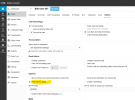
Regarding your voice issue. Go to the settings of one of the problem phones and in options change the value of "PBX delivers audio", and see if that helps:
1753160178739.png
 

Members Online Now

No members online now.

Forum statistics

Threads
111,831
Messages
589,277
Members
164,660
Latest member
RJenkinsROCK