Remove a User from Teams Integration

Martin_Thomas_HPA

Premier Customer
Advanced Certified
Joined
Aug 27, 2019
Messages
83
Reaction score
16
Hello,
i have not found any information about the steps to disable a user from Teams integration. I have removed all config on the Teams site for a User, but on 3cx it shows o365+teams... What must i do?
 
All you should need to do is remove the "Phone System" license from the user in the MS Admin Portal.
If you have allocated some other MS license to this user that includes "Phone System", then you need to allocate another MS license to this user that does not include "Phone System".
 
Ok this is one way. At the moment whe only enable O365 Usersync for users who want to use Teams integration. And if they dont want to use it after time we disable user sync for this User. But it is no option to disable E5 licenses for this user. Whe need to controll teams integration like the other o365 feautures like calendar sync. Have you an workarrout? Disable User sync for the User and than…. Restarting a Service or Recreate the user on 3cx or anything else….
 
After re-reading I think I understand the questions better.

In 3CX, in the "Users" node in the "Synced with" column, you will see "...+Teams" when 3CX detects that the user with this email has the necessary license to configure Teams.

Now when you run the Teams script 3CX generates, if you don't include this user, Teams won't be configured for this user.

So, as long as the User has a license that supports Teams Integration, you will always see it in the "Users" node. Whether you ever configure this user to integrate with Teams depends on whether you include their email int he script when you run it.
 
Ok i think i understand. The "+Teams" is shown because the user have a License with teams Voice on the ms side. 3cx do only route the call if "EnterpriseVoiceEnabled $true" on the teams side.
So if i want to disable a user from Teams usage without changing the License i must disabel enterprise voice and remove the 3cx Policyes for secure.

I will try it an give a feedback here......
 
  • Like
Reactions: NickD_3CX
So i have tried this. Normal calls are ok. But! ther is an Error with que calls. You can not answer this calls because it will be ring>cancel>ring>cancel......
I think the reason is that the call is forked to teams an there comes a Forbidden back because enterprisevoice is disabled. Now 3cx think the call is declined. If i am the only one agent in the Que i have a loop.....
Please check this!
Have you a workarround for me to remove the +Teams manualy from a user? I Disable o365 User Sync. And then? Delete and Recreate the user on 3cx or resart a service?
 
Have you a workarround for me to remove the +Teams manualy from a user? I Disable o365 User Sync. And then? Delete and Recreate the user on 3cx or resart a service?
That would be the only thing I can think of suggesting to try:
  1. Disable User Sync
  2. Delete User completely
  3. Recreate User manually and assign the same extension number
  4. Re-enable User but exclude this user from the User Sync
In this case I believe that the "Synced with" column for this user should be empty.
 
Ok that was my apprehension. I will try that. I think the best way for this scenario is that you implement a Userselection for the Teams Integration like the other O365 integrations.....
The Microsoft licenses only are no perfect source for the information that an user have or have not Teams. E5 have other things that are not included in E3, and it can be happen that a user have E5 and don't want to use Teams...
 
  • Like
Reactions: Evolute IT
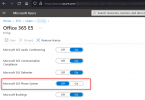
I did a bit of research and it seems like you can enable/disable various License attributes of the licensing bundles MS offers.
1646832082764.png


All you need to do is edit the E5 license of this user and disable the "Microsoft 365 Phone System" option.
Then if you wait 10-15 minutes and restart the Management Console and System Server services of your 3CX, then in "Users" you will see that this user has switched from "MS365+Teams" to only "MS365".

At this point you should also stop having the problem you described.
 
Ok Thank you. But it is a hard way for us. In a Enterprise Company voice Admin is normaly not AD Admin. I will contact our AD admin to find a way without long Processes to enable or disable teams integration. The way i discripted before with userselection in 3cx will be much more easyer as a process over two departments....
 
The way i discripted before with userselection in 3cx will be much more easyer as a process over two departments....
Agreed, but IF this is implemented, this would be a solution in the future.

What I suggested is a solution available to you now.
 
yes i understand. do you make a feauture request? or must i do this in the ideas category
 
yes i understand. do you make a feauture request? or must i do this in the ideas category
It is already something that is being considered, so not sure if an "Idea" thread would add to that.
As it is still being considered though, I can't say for sure if it will even be implemented or not though...
 
I have a question for sync issue. I already had experince about Teams integration last month.
I'm working a diffrent customer today. When I sign - in mic. account on inregration page. 3CX wants to take all users on the system. It took along time. I can see only 92 user account now. the company has more than 5000 mic. users. Integrations page look like still running. I couldn't find how I can stop and select part of users.
I didn't face the issue before. V18.0
 
Hi!

I can see only 92 user account now. the company has more than 5000 mic. users.
Where exactly do you see these users? Are they created in the Management Console --> Users? Or do you see them in Settings --> Microsoft 365 --> User Sync tab?


Integrations page look like still running. I couldn't find how I can stop and select part of users.
Once the sync starts you need to wait until it is finished, then you must remove the users from Settings --> Microsoft 365 --> User Sync tab that you don't want.
Also if the users were already created in the "Users" node on the left, you need to delete the extensions from there too.

I didn't face the issue before. V18.0
Could you please tell us exactly what build of v18 you are running?
You can see this in the Dashboard on the "Information" panel.
 

Members Online Now

No members online now.

Forum statistics

Threads
111,831
Messages
589,277
Members
164,660
Latest member
RJenkinsROCK