Ring group/queue membership by user

RobColver

Customer
Basic Certified
Joined
Sep 9, 2022
Messages
81
Reaction score
18
Is there any way to view/report which ring groups & queues a particular user belongs to? When you have a lot of ring groups/queues, it's very time consuming to find out which ones a particular user is a member of.
 
  • Like
Reactions: PBX128
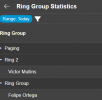
You may get the ring group statistics report, right there you can see the RG and the agents added.

1737125799481.png

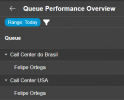
For a queue, you may get the queue performance overview report

1737125829373.png

Have a good day!
 
Many thanks for your reply. Ideally I wanted to select a user and see which RGs and Queues they belong to.
 
  • Like
Reactions: PBX128
Very good point!
And it would be super, if this could be exported/imported in user admin area. :)
 
Many thanks for your reply. Ideally I wanted to select a user and see which RGs and Queues they belong to.
that's the only alternative you may use now.
 
If ensuring a user is assigned to the correct departments, queues, and ring groups is a challenge for you, you may want to take a look at our 3CX Profile Manager tool.

This tool enables you to create named profiles (Examples: Sales, Reception, Support, Administration), assign departments, queues, and ring groups to that profile, then associate a users with that profile. Associating a user with a profile will automatically assign that user to the specified departments, queues and ring groups automatically.

If you move the user to a different profile, it will automatically remove the user from the previous departments and groups and add them to the new departments and groups associated with the new profile. You can even assign them to a specific queue skill level.

If you have a lot of departments, queues, and ring groups to manage, we can help!
 

Latest Posts

Forum statistics

Threads
111,962
Messages
589,993
Members
164,867
Latest member
swegner