Solved router phone help needed

Status
Not open for further replies.

uhs-roycruse

Customer
Advanced Certified
Joined
Nov 3, 2021
Messages
63
Reaction score
9
Hi Ive added a Fanvil V64 to a remote location (main system is on prem) and this phone is connecting fine. I cant find in any of the router phone setup docs if im supposed to do anything to the setup of this phone to make it a router phone ? The only documentation centres around adding other phones that will use this as a router phone.

When I try to add another phone to a user at the remote location the v64 is not listed to select it as a connection method.

does it make a difference what the new phone is - im trying to add a fanvil X3S
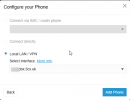
1744122249814.png
 
Is the v64 visible under trunks and chat as router phone?

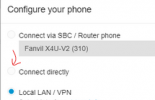
You need to tick "connect via SBC..." and choose the v64 there.
 
no the v64 does not appear in the the Voice & Chat list as a router phone - what do i need to do to the v64 config to get it to appear here
 
Just follow the manual for this phone to register it as router phone. Please be sure to have the correct firmware before you provision the phone.
 
I'm not clear, did you add the V64 as a router phone? ("connect directly" in the GUI there) If not, delete it, factory reset it, and re-add it.
 
  • Like
Reactions: CentrexJ
maybe im missing something but is the "manual" your reffering to this https://www.3cx.com/sip-phones/fanvil-v-series/

If so the only bit i can see reffering to router phones is where it discusses setting up another phone to connect via a router phone ie step 3.

i cant seem to find the bit where you set it up AS a router phone
 
the v64 is already configured via the PNP phones page - does that mean it cant be a router phone now - will i have to recall it from its remote location and re set it up and am i right in now understanding it will only function as a router phone if i add it via the users ip phone > +add button and select "connect directly" ? not the most intuitive of systems is it... where does it say this in the manual ?
 
You would need to set it up again.

Note the router phone needs to be on the same network as the new/second phone you're trying to set up. So the other phone can proxy through the router phone. You mentioned "remote location"...

Technically you don't have to have the phone in hand, you just need to be able to factory reset it. Yealinks can do this from the phone's web interface, or there are keystrokes. Don't have much experience with Fanvil but I'd expect they can also. Then when the phone boots it should pick up the new router phone settings.

https://www.3cx.com/sip-phones/fanvil-v-series/#h.wmsoriilsyve
"b. If the phone is a router phone you can configure it to connect directly if you prefer."

It does say "if 3CX is on the cloud" in that section, but "if 3CX is not on the same network as the phone" would be another way to write that.
 
  • Like
Reactions: HarryI and bitn2
Thanks all - I now have a router phone configured :)
 
Status
Not open for further replies.

Members Online Now

No members online now.

Forum statistics

Threads
111,834
Messages
589,287
Members
164,663
Latest member
svdDGS