Routing SIP call to PSTN

Status
Not open for further replies.

nurv

Free User
Basic Certified
Joined
Mar 28, 2018
Messages
11
Reaction score
1
I have the a setup as below:

3CX V16 running on Debian on a WM on a QNAP
Gateway is Draytek Router Vigor 2860Vac with VOIP Capability.
1no. SIP client Crestron TSW-760
3no. 3CX App on iOS
1no. 3CX App on Android

I have managed to connect the Draytek to 3CX as can I see it is registered on both 3CX and on the Draytek.

I have a couple of issues I like assistance in getting resolved.

1. I am getting a Firewall Test failure on the 3CX Firwewall Checker. The error is related to the port 5060. The Firewall I am using on the Draytek. I had set this up when I was running V15.5 on a Win10 WM on a QNAP and I was not getting this error. I am getting this error on the V16 on Debian. I have name made any changes to the Firewall settings. The config on the V16 is backup restore of the config on V15.5 before. Could you assist as to why this may be happening.

2. I have connected the telephone line to the Draytek. I am not able to route any calls to and from the SIP clients from and to the PSTN if I dial out any external phone number. Is there something I am missing that needs to be configured for this? When using the 3CX app on the mobile device I get a message not found.

Your assistance to get his resolved will be most appreciated.

Kind regards,
Nirav
 

Attachments

  • 3CX_Error1.JPG
    3CX_Error1.JPG
    63.1 KB · Views: 6
While the Router does have a PSTN connection, whether or not it can be used for trunking, in and out of 3CX, or, is simply used as a line with connections to a set also connected to the router, I can't say. To be used as a 3CX trunk, the PSTN port must be assigned a unique (to the router) port that is then used in the 3CX trunk settings. The router must also be able to "forward" calls onto 3CX.
 
Have a look at this guide here: https://www.3cx.com/docs/draytek-firewall-configuration/

So this is one of those Drayteks with a phone and line port included ?
I had used the exact same guide to configure the firewall on the Draytek. As stated when I was running V15.5 on a Win10 WM on QNAP. I was not getting the firewall error. I have only gotten this error since upgrading to V16.

Yes this is the one of the Drayteks with a phone and line port included.
 
While the Router does have a PSTN connection, whether or not it can be used for trunking, in and out of 3CX, or, is simply used as a line with connections to a set also connected to the router, I can't say. To be used as a 3CX trunk, the PSTN port must be assigned a unique (to the router) port that is then used in the 3CX trunk settings. The router must also be able to "forward" calls onto 3CX.
I imagine that the is suitable for use with 3CX as this particular is capable of VOIP
 
I imagine that the is suitable for use with 3CX as this particular is capable of VOIP
Most routers that support VoIP (have (usually) FXS, or (on occasion) FXO ports, are not primarily designed to be used with a SIP server on the LAN side. The exception may be the Fritzboxes. Unless someone comes forward with information on using the VoIP portion of that router with 3CX, you may be on your own in trying to get it to work. As I stated, 3CX must be able to contact (for outgoing calls) the FXO port using a IP and a port assigned to that FXO service.
 
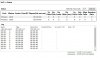
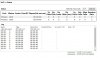
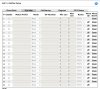
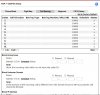
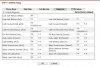
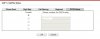
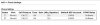
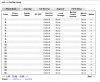
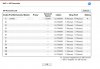
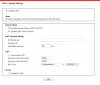
See attached the settings on the Draytek router for the VOIP. Do let me know if there is anything that I need to be doing here.
 

Attachments

  • Draytek_VOIP_Settings_Page10.JPG
    Draytek_VOIP_Settings_Page10.JPG
    92.7 KB · Views: 5
  • Draytek_VOIP_Settings_Page9.JPG
    Draytek_VOIP_Settings_Page9.JPG
    92.7 KB · Views: 5
  • Draytek_VOIP_Settings_Page4.JPG
    Draytek_VOIP_Settings_Page4.JPG
    140.8 KB · Views: 3
  • Draytek_VOIP_Settings_Page5.JPG
    Draytek_VOIP_Settings_Page5.JPG
    106.6 KB · Views: 3
  • Draytek_VOIP_Settings_Page6.JPG
    Draytek_VOIP_Settings_Page6.JPG
    102.5 KB · Views: 3
  • Draytek_VOIP_Settings_Page7.JPG
    Draytek_VOIP_Settings_Page7.JPG
    40 KB · Views: 4
  • Draytek_VOIP_Settings_Page8.JPG
    Draytek_VOIP_Settings_Page8.JPG
    38.3 KB · Views: 3
  • Draytek_VOIP_Settings_Page3.JPG
    Draytek_VOIP_Settings_Page3.JPG
    103.1 KB · Views: 3
  • Draytek_VOIP_Settings_Page2.JPG
    Draytek_VOIP_Settings_Page2.JPG
    84.3 KB · Views: 3
  • Draytek_VOIP_Settings_Page1.JPG
    Draytek_VOIP_Settings_Page1.JPG
    71.2 KB · Views: 4
Looking over what you have posted (keeping in mind that I am not at all familiar with the Draytek, any model), I suspect that the PSTN port is ised, in conjuction with the digit maps, to route dialled calls (from a set plugged into a phone port) to either a VoIp provider, or the PSTN line. For some of the settings (phone ports), you have put in10000,. that number would be used if there were FXO settings, and the trunk were to register, and be reachable by 3CX, which i suspect won't happen. You may be able to register one, or both of the FXS ports with 3CX IF the router allows a connection with a local IP. I'm assuming that the 3CX server is on the LAN side of this router. If you are using 3Cx hosted, then you'd probably have more of a chance this will work, for the FXS ports.
I don't hold out hope that the FXO port can be registered with a VoIp server unless there are addition settings you have not posted.
 
Status
Not open for further replies.

Forum statistics

Threads
111,935
Messages
589,823
Members
164,816
Latest member
natedog