Salesforce Integration

Status
Not open for further replies.

smith808

Forum User
Joined
Aug 27, 2019
Messages
3
Reaction score
0
I am tasked with integrating Salesforce with 3CX.

It appeared to be straight forward, however...

Here is the link to the instructions I followed:
https://www.3cx.com/docs/salesforce-crm-integration/

Salesforce version: Lightening Enterprise
3CX version: Enterprise 16.0.493

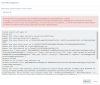
I get the following error in the image below and I am not sure how to proceed.

Your help is appreciated.

Thank you in advance.
14160
 
Hello @smith808,

This is because you have hidden fields in Salesforce, which prevent the lookup to work properly. In this case, the query is failing because the standard field AssistantPhone on entity Contact is missing. You just need to edit the Salesforce configuration to make this field visible to the query, not necessarily visible in the layout. This way the query will succeed.

In order to do this change:
  • Go to “Setup Home > Objects and Fields > Object Manager > Contact > Fields.”
  • Click on the field that you want to make visible, for example “AssistantPhone”.
  • Press the “View Field Accessibility” button on the upper right side of the screen.
  • Click on the “Hidden” label on the right of “Standard User” (or the use profile you're configuring for the integration).
  • Under the “Field-Level Security” check the “Visible” option.

That should do the trick. Please after doing this change, test a new call and if it doesn't work, please check the log to see if there is another field hidden that you need to make visible.

Kind regards.
 
Status
Not open for further replies.

Forum statistics

Threads
112,147
Messages
590,961
Members
165,167
Latest member
Finatra.us