Salesforce not journaling certain call activity due to GET request not finding certain numbers

Status
Not open for further replies.

ochapple

New User
Basic Certified
Joined
Dec 19, 2019
Messages
48
Reaction score
10
I cannot figure this issue out - Salesforce is journaling some 3cx calls in Activity and not others and it's because the GET request cannot find some numbers that are present and should be fine.

I have run verbose logging and investigated the 3cxSystemService.log file and have discovered the following:-
The problem with the non-journaling of activity for certain numbers, is ultimately and logically, due to a no-match (empty id), even though I know for absolute certain, that the GET request appears to be looking for the correct last 7 digits of an existing Account and Contact 'Phone' field number.

Not only but also, the duplicate error handler can successfully find the very same Phone number for a New contact name that it successfully creates, straight after not successfully finding the number in Contact, Lead, or Account Phone number. Bizarrely it cannot look up the very same contact 'New' That it creates from the number it just couldn't find, and has therefore created. So I know there must be a fundamental problem, and not with anything I am doing. Perhaps its certain numbers, but we cannot yet pin down which types of numbers it can find and which it cannot.

For an example of a record in SF that I have been working with, there is a Phone field entry both in the Account object Phone number field, which is not hidden (so no error), and also the number I am attempting to have found is also there in SF under the Contact object also in the Phone field. Whether I remove the number from the Account Phone field or not so as to remove a duplicate, it makes no difference, and I would not expect it to.

Salesforce does correctly create a NEW contact first name when it doesn't successfully find the number being looked up with the GET request, and then when I search the number in Salesforce it then shows the New contact is there.
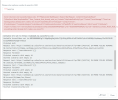
The 3CX Integration -> Run Test, where you type in the number, also successfully finds the duplicate and gives me the error warning message in red at the top, so the duplicate finder part of the SQL query is finding the New Contact the query (INSERT) itself adds, but the actual matching SQL is not finding it. I cannot figure out where the problem may lie as the GET request looks fine in the V2 Template, and also looks fine in the 3CXSystemService.log , and lastly is also fine in the 3CX Integration test harness, in the CRM Tab.

See the attached screenshot, that the number being called does indeed exist as a duplicate when it has not found the number under Contact, Lead or Account, because it shows the error and you can then also see 3CX's Salesforce query below then cannot find the very same contact it has just found the duplicate for and, (empty id).

Please help as I'm pretty sure this is a bug somewhere.

Kind regards,
Oliver
 

Attachments
Last edited:
You need to ensure that numbers are stored in Salesforce exactly as you receive them from your SIP Trunk, or after modifying the numbers format using caller id reformatting techniques.
Where do I see how they are received from SIP Trunk? I don't even see SIP Trunks in my system as shown in that link.
 
You will see that in the 3CX call logs for example, or when you receive a call, the caller number you see.
 
Hello,

We also use Salesforce with 3Cx integration in an international context (variable phone number lengths, and numbers sometimes stored as local numbers, or with an international prefix, depending on the users).

After extensive analysis of the issue, we believe there is a design flaw in the 3Cx implementation. Basically for a call log to be recorded, there are two distinct lookups that must work:
- the first one is done at the call initiation and using the Salesforce API using a "FIND ... IN PHONE FIELDS" query - Salesforce is using its own fuzzy matching technique and is very good at matching a number with internal prefix or not, spaces or not, etc. - this usually works very well!
- the problem is with the second lookup done at the end of the call, this one is done by 3Cx into its Contact Directory and is not using fuzzy matching to match the phone numbers - this means a contact which was recorded in Salesforce with an international prefix, but then dialled in 3Cx with a local prefix will fail this second lookup

IMHO the design flaw lies in the fact that the first successful lookup (leveraging Salesforce fuzzy matching) should be enough to have the necessary Salesforce Contact ID and record the call log - all the necessary info is known at this point. The second lookup is much "dumber" in that it expects an exact phone number match without adjusting for international / local prefix, so all the "smartness" of Salesforce phone number lookup is lost...

The other (bad) side effect is that all our CRM contacts end up written in the 3Cx Contact Directory which is then sync'ed to all the physical phones in the company - a clear data privacy issue...

3Cx support have been contacted on those two points and sadly do not acknowledge the issues, the answer to the phone matching is always "strictly align your phone numbers in CRM with the international format everywhere" which is not practical at scale and also not really required since Salesforce knows how to match phone numbers entered in different formats.

If anyone has been able to take this further I am very interested to hearing it!

Cheers :-)
 
Hello @adebernis,

We also use Salesforce with 3Cx integration in an international context (variable phone number lengths, and numbers sometimes stored as local numbers, or with an international prefix, depending on the users).

After extensive analysis of the issue, we believe there is a design flaw in the 3Cx implementation. Basically for a call log to be recorded, there are two distinct lookups that must work:
- the first one is done at the call initiation and using the Salesforce API using a "FIND ... IN PHONE FIELDS" query - Salesforce is using its own fuzzy matching technique and is very good at matching a number with internal prefix or not, spaces or not, etc. - this usually works very well!
- the problem is with the second lookup done at the end of the call, this one is done by 3Cx into its Contact Directory and is not using fuzzy matching to match the phone numbers - this means a contact which was recorded in Salesforce with an international prefix, but then dialled in 3Cx with a local prefix will fail this second lookup

IMHO the design flaw lies in the fact that the first successful lookup (leveraging Salesforce fuzzy matching) should be enough to have the necessary Salesforce Contact ID and record the call log - all the necessary info is known at this point. The second lookup is much "dumber" in that it expects an exact phone number match without adjusting for international / local prefix, so all the "smartness" of Salesforce phone number lookup is lost...
This is incorrect. There is only 1 contact lookup against the CRM, and it happens when the call is received through the SIP Trunk, or when the call is made against the SIP Trunk. The contact details obtained from this lookup are used to log the call when it ends. If this is not working for you, most probably this is caused by the formats in which you store numbers, as you said sometimes with international format, sometimes with local format. The Salesforce logic to match contact numbers is not as good as you describe based in our experience. Only a full match works, so this is most likely your issue.

The other (bad) side effect is that all our CRM contacts end up written in the 3Cx Contact Directory which is then sync'ed to all the physical phones in the company - a clear data privacy issue...
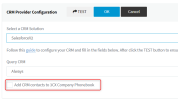
This behavior can be configured and disabled. Go to Settings > CRM, and uncheck the option "Add CRM contacts to 3CX Company Phonebook".
1667386239961.png

3Cx support have been contacted on those two points and sadly do not acknowledge the issues, the answer to the phone matching is always "strictly align your phone numbers in CRM with the international format everywhere" which is not practical at scale and also not really required since Salesforce knows how to match phone numbers entered in different formats.
That's the way number matching works with Salesforce. If you check the 3cxSystemService.log in verbose mode you will confirm that this is causing the issue.
 
Hello @edossantos,

Thanks for your quick reply, much appreciated!

Salesforce logic is easily tested by using any REST API client (postman, insomnia, curl...) and doing a call with:
- URL: https://(yourdomain).my.salesforce.com/services/data/v52.0/search/
- a proper token
- query parameter "q" = FIND {xxxxxx} IN PHONE FIELDS RETURNING Contact(Id,FirstName,LastName,AssistantPhone,Fax,HomePhone,MobilePhone,OtherPhone,Phone,Email,AccountId)
- (replace xxxx by the input number you want to match)
In our tests this was matching any combination... but of course this might be specific to our specific needs.

We have used verbose mode logging and extensive analysis of the logs with our developers and I stand by the fact that a second lookup is done using SQL against the 3Cx database (contact directory), and that if this lookup fails the call log is not recorded.

That being said, we will try to remove the "Add CRM contacts to 3CX company phonebook", it could very well be that this disables the second lookup and solves the problem for us, stay tuned!

Cheers ;-)
 
We have used verbose mode logging and extensive analysis of the logs with our developers and I stand by the fact that a second lookup is done using SQL against the 3Cx database (contact directory), and that if this lookup fails the call log is not recorded.
I would like to see that, to understand what's going on. But I'm certain that there is no second lookup. You might be misunderstanding the log. Feel free to send the log to me in a private message, so I can take a look and let you know what I see.
 
@ochapple
We have been struggling with records logging to Salesforce as well.
Do you have a consistent format for phone #s in Salesforce?
What matching logic did you end up using within 3CX?
Hi Matt, as edossantos said, we had to update our telephone numbers in SF to be in e164 format and of course that takes some time to achieve, so I got the sales and customer success team to add +44 to each number as they either liaised with a customer, updated a record or sent out a contract that they had to update the primary contact number and contact's number. During the migration for each inbound call, the team had to log the call manually and with that change the tel records in SF as part of the migration/transformation to e164.
The NET effect 6 months later is we have essentially migrated to our account records and key contacts all to e164 numbers form non-e164 numbers.
It was rather painful having people call in and calls appear in SF and not log, which I think was crazy. I have no idea why the old matching system which worked absolutely fine pre v18, couldn't have been successfully migrated to V18 as it was.
Perhaps a database optimization due to the overhead and cloud costs related to compute cycles, maybe RAM as well, that was the tech reason to push for a direct lookup.
 
Status
Not open for further replies.

Forum statistics

Threads
112,147
Messages
590,961
Members
165,167
Latest member
Finatra.us