Salesforce not journaling certain call activity due to GET request not finding certain numbers

Status
Not open for further replies.

ochapple

New User
Basic Certified
Joined
Dec 19, 2019
Messages
48
Reaction score
10
I cannot figure this issue out - Salesforce is journaling some 3cx calls in Activity and not others and it's because the GET request cannot find some numbers that are present and should be fine.

I have run verbose logging and investigated the 3cxSystemService.log file and have discovered the following:-
The problem with the non-journaling of activity for certain numbers, is ultimately and logically, due to a no-match (empty id), even though I know for absolute certain, that the GET request appears to be looking for the correct last 7 digits of an existing Account and Contact 'Phone' field number.

Not only but also, the duplicate error handler can successfully find the very same Phone number for a New contact name that it successfully creates, straight after not successfully finding the number in Contact, Lead, or Account Phone number. Bizarrely it cannot look up the very same contact 'New' That it creates from the number it just couldn't find, and has therefore created. So I know there must be a fundamental problem, and not with anything I am doing. Perhaps its certain numbers, but we cannot yet pin down which types of numbers it can find and which it cannot.

For an example of a record in SF that I have been working with, there is a Phone field entry both in the Account object Phone number field, which is not hidden (so no error), and also the number I am attempting to have found is also there in SF under the Contact object also in the Phone field. Whether I remove the number from the Account Phone field or not so as to remove a duplicate, it makes no difference, and I would not expect it to.

Salesforce does correctly create a NEW contact first name when it doesn't successfully find the number being looked up with the GET request, and then when I search the number in Salesforce it then shows the New contact is there.
The 3CX Integration -> Run Test, where you type in the number, also successfully finds the duplicate and gives me the error warning message in red at the top, so the duplicate finder part of the SQL query is finding the New Contact the query (INSERT) itself adds, but the actual matching SQL is not finding it. I cannot figure out where the problem may lie as the GET request looks fine in the V2 Template, and also looks fine in the 3CXSystemService.log , and lastly is also fine in the 3CX Integration test harness, in the CRM Tab.

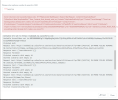
See the attached screenshot, that the number being called does indeed exist as a duplicate when it has not found the number under Contact, Lead or Account, because it shows the error and you can then also see 3CX's Salesforce query below then cannot find the very same contact it has just found the duplicate for and, (empty id).

Please help as I'm pretty sure this is a bug somewhere.

Kind regards,
Oliver
 

Attachments
Last edited:
Try this: set the Advanced > Contacts > Options > Matching thing to 10-digits at least, or even match exactly, then try again.

This will force the integration do search using the full number (or last 10-digits) when doing the lookup, instead of just 7. But then, when it creates it, it uses the full CID.

I believe Salesforce stores the numbers in full format so it needs a search like it.
 
  • Like
Reactions: edossantos
Thanks @ConceptsWeb, i made it match on 11 digits instead of 7 and sure enough the 3CX CRM test harness works but the actuall call journalling now won't log any calls, not just some. Don't know why yet.

The test harness works so its something else now to look for, but clearly the matching of digits is to blame somewhere.
 
3CX will only log calls when there is a matched contact. This could happen because the contact already existed in Salesforce, or it was created by 3CX when it was not found. So the first thing to check is why contacts are not being matched. Do you see the caller's name and contact URL taken from Salesforce when you receive the call in the Web Client / Desktop App?

Please note that the number used in contact lookup must match exactly the number stored in Salesforce. And also, please note that Salesforce will automatically reformat the numbers you enter if you're in US or Canada, and try to store numbers starting with 1. This could cause that the number you receive from your SIP Trunk doesn't match exactly the number in Salesforce. This can be avoided if you use the plus (+) symbol as a prefix. You can check the notes and details about this here:
https://www.3cx.com/docs/salesforce-crm-integration/#h.sh2udbgzpt45

The 3CX logs will tell you the number being used during contact lookup, and you can compare that against the number you have in Salesforce for that contact.
 
Hi edossantos,
I'm based in the UK our Salesforce Phone numbers are NOT stored in e164 format. Further to the above information, I have now created a CallerID reformat for inbound and outbound, at least for now, just to make sure all UK numbers work not just some tel numbers.

I have created an inbound and outbound rule : (+44)(.*) replaced with 0\2,
so that the numbers stored in our Salesforce which are generally not e164, should be processable.

They only get converted to e164 for the SIP trunk call (Twilio) using the SIP Trunk's Outbound Rule configuration which adds back in +44. Is that the right way to do it? Simply because and on the basis all our numbers in Salesforce are not stored in e164.

I should be able to use the Advanced > Contacts > Options - match on X digits option. But If I use 7 digits to match - no calls log for say the 01865 numbers but do for most mobile numbers. If I use 6 Digit Contact matching with the above Caller ID reformatting, Salesforce starts logging calls again.

So I fully understand 3cx will only log calls wen there is a matched contact. That's what i have been checking on in the logs as you can see, But what the CRM test feature finds successfully and then what actually logs in Salesforce appear to be 2 different things/results. So a contact can be found in the test, but then not found in the 3CXSystem Log and there are multipe places to change the matching options that affect the logged output, which as the Contact Options (Matching), Caller ID reformatting and the SIP Trunk Inbound and Oubound rules. Its the mix of the these 3 options that is the headache to work out.

Here is where the confusion lies and the test feature not a great help since you would asssume if it can find the contact in the test then it should log the call, but doesn't because of course how 3CX executes a call seems to create different results for the Contact lookup and thus the CRM Test lookup result is different to the actual Call result. Is that right?
 
The test functionality provided by the management console will use the number as you enter it. However, if your SIP Trunk provides a different number format, for example adding a country code, then the result will be different....

You can also use the MC > Advanced > Contacts > Options > Match X digits option. But this will always cut that number of digits from the caller's number. If your numbers in Salesforce are ALWAYS 9 digits length, then you can set this to 9. But if you have numbers stored in Salesforce with 10, 9 or 8 digits, then this will not work for all cases...

The overall idea is that to get a match, you need that the number used by 3CX to query is exactly the same as the number stored in Salesforce. How to reach this will depend on your configuration. The simplest way to do this is using E164 format everywhere. But as you're not using E164 on the Salesforce side, you will need to adjust the number format on the 3CX side. This can be done by applying Caller ID reformatting techiques, or cutting the number to X digits from the 3CX contact options.
 
  • Like
Reactions: TheodorosG_3CX
I've started to make certain contacts and accounts e164 format in salesforce to test the theory. I have removed the Caller ID reformatting. I have made the matcing in contacts an exact match. The test harness fiinds the account and contact with the e164 number fine, but its now not logging the call.!! What could be going wrong? The call dials out fine over Twilio.
 
Here is the 3CX servicelog.
I have replaced the names and numbers so as not to break GDPR. THe call says its journalling here but then doesn't appear in the call Activity journal where it had previously in the day using a 6 digit match. Now its using exact match...


2022/10/11 18:43:26.284|9584|0071|Verb|CRM: The response is: '{"searchRecords":[{"attributes":{"type":"Contact","url":"/services/data/v52.0/sobjects/Contact/0033X00003dZJ3mQAG"},"Id":"0033X00003dZJ3mQAG","FirstName":"James","LastName":"Blunt","AssistantPhone":null,"Fax":null,"HomePhone":null,"MobilePhone":"+44123 4 567567","OtherPhone":null,"Phone":"+4420 1234 7777","Email":"[email protected]","AccountId":"00120000010h0V8AAI"}]}'
2022/10/11 18:43:26.284|9584|0071|Verb|CRM: Filtered variables for matching:
2022/10/11 18:43:26.284|9584|0071|Verb|CRM: 'AccountId' = '00120000010h0V8AAI'
2022/10/11 18:43:26.284|9584|0071|Verb|CRM: 'Phone' = '+4420 1234 7777'
2022/10/11 18:43:26.284|9584|0071|Verb|CRM: 'OtherPhone' = ''
2022/10/11 18:43:26.284|9584|0071|Verb|CRM: 'Email' = '[email protected]'
2022/10/11 18:43:26.284|9584|0071|Verb|CRM: 'LastName' = 'Blunt'
2022/10/11 18:43:26.284|9584|0071|Verb|CRM: 'HomePhone' = ''
2022/10/11 18:43:26.284|9584|0071|Verb|CRM: 'Id' = '0033X00003dZJ3mQAG'
2022/10/11 18:43:26.284|9584|0071|Verb|CRM: 'EntityType' = 'Contact'
2022/10/11 18:43:26.284|9584|0071|Verb|CRM: 'MobilePhone' = '+441234 567890'
2022/10/11 18:43:26.284|9584|0071|Verb|CRM: 'Fax' = ''
2022/10/11 18:43:26.284|9584|0071|Verb|CRM: 'AssistantPhone' = ''
2022/10/11 18:43:26.284|9584|0071|Verb|CRM: 'FirstName' = 'James'
2022/10/11 18:43:26.284|9584|0071|Verb|CRM: Processing scenario 'GetAccountName'.
2022/10/11 18:43:26.284|9584|0071|Verb|CRM: Creating new HttpClient for Scenario authentication.
2022/10/11 18:43:26.284|9584|0071|Verb|CRM: Bearer '00D20000000CgJi!ARgAQCIkZpmaMASX6LdvyjDVuv5SEStc78CrkJPgIxtRNRqiGpLlOGOs0tG4aNx_Gldqeb8c4B.0Xenrkd9lxWUtLSqUmjaa'
2022/10/11 18:43:26.285|9584|0071|Verb|CRM: Performing GET request 'https://webdadi.my.salesforce.com/services/data/v52.0/query/?q=SELECT Name from Account where Id = '00120000010h0V8AAI''.
2022/10/11 18:43:26.297|9584|0007|Verb|Enqueue Deleted.CONNECTION.2685
2022/10/11 18:43:26.297|9584|0007|Verb|Enqueue Deleted.CONNECTION.2686
2022/10/11 18:43:26.298|9584|0022|Verb|Dequeue Deleted.CONNECTION.2685
2022/10/11 18:43:26.298|9584|0022|Verb|Dequeue Deleted.CONNECTION.2686
2022/10/11 18:43:26.299|9584|0071|Info|CRM: about to report 1 calls at maxConcurrency 1
2022/10/11 18:43:26.299|9584|0071|Verb|CRM: Triggering Call Journaling with values - CallType='Inbound' - PhoneNumber='+442081237777' - ContactName='' - AgentExtension='320' - AgentFirstName='Me' - AgentLastName='Someone' - AgentEmail='[email protected]' - ContactRawData='' - StartTime='10/11/2022 5:43:26 PM' - EndTime='10/11/2022 5:43:26 PM' - EstablishedTime='10/11/2022 5:43:26 PM'
2022/10/11 18:43:26.300|9584|0071|Verb|CRM: Processing scenario 'ReportCall'.
2022/10/11 18:43:26.300|9584|0071|Verb|CRM: Creating new HttpClient for Scenario authentication.
2022/10/11 18:43:26.300|9584|0071|Verb|CRM: Bearer '00D20000000CgJi!ARgAQCIkZpmaMASX6LdvyjDVuv5SEStc78CrkJPgIxtRNRqiGpLlOGOs0tG4aNx_Gldqeb8c4B.0Xenrkd9lxWUtLSqUmjaa'
 
I would like to see the full 3cxSystemService.log file. Can you send it to me in a private message?

From this snippet, I can tell you that there is no match, because the ContactRawData is empty. That field should have the contact ID and type (contact, lead or account). That explains why the call is not being logged. What I don't understand is why the contact is not being considered a match.

Please note that not all CRM responses are considered a match. In order to be a valid match, 3 things need to happen:
1) The phone number being searched is present in a phone field in the CRM response. I can't tell if this is the case, because I don't see the start of the log where it tells you the number being searched.
2) The first name, last name or company name must have a value. This should be OK according to the log (except if you changed those values due to GDPR).
3) A unique contact URL is provided. This should be OK, as the template builds this from the Contact ID, and this ID is present.
 
  • Like
Reactions: ochapple
I would like to see the full 3cxSystemService.log file. Can you send it to me in a private message?

From this snippet, I can tell you that there is no match, because the ContactRawData is empty. That field should have the contact ID and type (contact, lead or account). That explains why the call is not being logged. What I don't understand is why the contact is not being considered a match.

Please note that not all CRM responses are considered a match. In order to be a valid match, 3 things need to happen:
1) The phone number being searched is present in a phone field in the CRM response. I can't tell if this is the case, because I don't see the start of the log where it tells you the number being searched.
2) The first name, last name or company name must have a value. This should be OK according to the log (except if you changed those values due to GDPR).
3) A unique contact URL is provided. This should be OK, as the template builds this from the Contact ID, and this ID is present.
Hi edos, i have sent you the log file in a direct conversation. I cannot see any difference in the log for why the same number fails to be found and then succeeds to be found a few minutes later with no changes and on an exact match.
 
Thanks for sending the requested logs. As I explained to you in this private conversation, this looks like an issue on the Salesforce side, which is not returning the contact record for exactly the same query requested from 3CX.
 
Thanks very much for your input, I have no idea why Salesforce would sometimes find the data using the query and sometimes not. This is a mystery. One hypothesis i had today was perhaps Salesforce is batch updating records that takes place in pages like the Account object, using Flows or Process Builder that run as background tasks after a record is updated.
However there are Accounts that have previously had a call log successfully and then subsequently not logged a call, without the data changing other than having logged a call, so we know the Phone field data was there for Salesforce to query, so why would it no longer be at a point in time only 6 minutes later? So in my opinion there has to be either a bug or a process stopping the journalling somewhere as only 50% of our calls are logging in Salesforce on average amongst all the sales team. I think we are going to give up as there is no way to trace the source of the issue within Salesforce. With your muscle and influence with Salesforce is there anything you can get an opinion on as to where to look, so why data would be intermittently un-query-able or un-retrievable? We are on the Professional edition not Enterprise edition of Salesforce.
 
This is indeed very weird. I have never seen this before, and we have many many customers using this integration, so I would bet that this is somehow related to those background processes that you mentioned. That doesn't explain why a customer had a call logged, and some time after the call was not logged, but we would have to check the logs for that specific case to understand what happened, maybe it's something else in that case, I can't tell.... But for sure, in the case we checked in the last logs you sent, the same query didn't throw any result the first time, and it did a few seconds after, that explains what happened in that particular case.
 
Thanks Ernesto, I deactivated process builder's tasks related to the jounral and that didn't make any difference. So its only flows to go into next. I will keep trying a few things in Salesforce to see if I can halt some possible culprit flows.
 
Feel free to share 3CX logs with me in case you don't understand what 3CX is doing at any step.

If you need to contact Salesforce to ask them why the query is not returning data, my recommendation is that you don't mention an integration with 3CX, because they will just tell you to go back with us. You should simplify the question as much as possible, and tell them that a specific REST API query is not returning data, when the data should be available. This way they will need to investigate.
 
  • Like
Reactions: Evolute IT
Much appreciated Ernesto. Yes I think i'm just struggling interpretting or knowing what to look for, vis a vis the 3CX - SF handoff outputs, as I can clearly see the call initiation and contact matching through SQL executing, and with resulting ID's being created, but I can't see where or what it then does not complete for, so whatever it should in fact complete, as I have no idea what that should be, if you catch my drift. If there is any text you suggest I search for in the log files and then step into, please do let me know. Many thanks. Oliver
 
All the log lines related to the CRM lookup start with "CRM: ", so that's something you can use to start filtering out the log.
 
  • Like
Reactions: Evolute IT
@ochapple
We have been struggling with records logging to Salesforce as well.
Do you have a consistent format for phone #s in Salesforce?
What matching logic did you end up using within 3CX?
 
@ochapple
We have been struggling with records logging to Salesforce as well.
Do you have a consistent format for phone #s in Salesforce?
What matching logic did you end up using within 3CX?
You need to ensure that numbers are stored in Salesforce exactly as you receive them from your SIP Trunk, or after modifying the numbers format using caller id reformatting techniques.
 
Status
Not open for further replies.

Members Online Now

Forum statistics

Threads
111,832
Messages
589,285
Members
164,662
Latest member
DejanMDS