SBC / Router phones Delete unused orphan entries in Admin client under the Voice Chat tab

Status
Not open for further replies.

BK63

Customer
Joined
Jul 27, 2023
Messages
7
Reaction score
1
In the process of experimting with router phones T53W T54W over the last week I got everything working but then decided to make changes and thats when I ended up creating and deleting ext/router configs but I can't delete the pictured entries.

-If you create an SBC in that screen you can't delete it
-If you delete a router phone it may not release 3CX's provisioning entry so the phone boots and tries to configure to the ext you deleted
-Attempting to start over you can't get very far because the MAC address 'value' is already in use.

Everything is current and required releases. These two phone had clean RPS entries at the start. Redirection from Yealink RPS seems to make the connection to 3cx provisioning database but it would probably be helpful to delete those 3cx entries.

In ref to pic... if you click on the phone icon it leads to a screen that says no ip phone configured. If you click on the pen it only lets you change the name. There is no delete that I can find. Nothing shows in phones or user tabs.

This is a self hosted server.

I am in the remote location, its possible that if I could connect these two phone tp the servers lan directly maybe 3cx would be smart enough to sort it out but don't know at this time

Any help appreciatedpic11.png
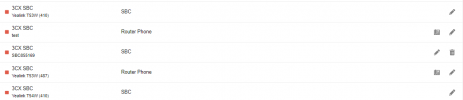
 
Now that you removed the phones. Go to sip section on regular management console and delete the orphan sbc devices.
 
  • Like
Reactions: Evolute IT
Solved all my issues.... Thank You! I am releived that it was in a location that I overlooked rather than stuck in the database somewhere. :)
 
BK63, could you share the exact sequence of steps that led to this situation please?
 
I think it was a combination of things many of which would be my own fault.

In retrospec the situation could have been helped by a more discriptive error message in one particular spot and less confusion on my part as to where a router phone can or can't be established. Also it was totally lost on me that establishing a router phone or SBC would create an entry under the SIP tab of the mangement console.

The instructions are to establish a router phone using the Admkin console although it seems that you can also do that from the Mangement console by not accepting the default drop downs when adding a phone but thats only because I had these orphaned entries in that drop down list under "3CX Session Border Controller". So initially I didn't know that I wasn't defining a router/SBC vs selecting one. The latter was actually the case.

The extra SBC entries were just from adding an SBC in the Admin console and then seeing no way to delete them, again not aware that the entries could have been deleted in the Managemnt console.

Despite all my mis-steps I would like to suggest two things that might help others in the future the first is when adding a router phone if you attemp to use an existing MAC address the error box says "Error Phones: Value already in use". I'd like to see that be more specific like "already defined in SIP tab" .This threw me off because this is the configuration point where you would also receive an RPS error if the phone was already in the Yealink database. Different look to that message but same failure point so I though it meant that it was an orphan in the 3cx database on your site and would take 14 days to expire.

The second is that in the Voice / Chat tab of the Admin client there iis a list of router phone and SBC definitions even if there is no phone associated with them.This was the area that I could add SBC's, edit names of existing listings or click on the phone icon where in this case led me to a screen that said no phone was defined.That was were I couldn't understand why I couldn't get rid of these entries and had no idea they were listed and deletable elsewhere.

Initially adding the first router phone went very easily it was when I started to add and delete that things atrted to pile up and cause issues.All and all a good learning experiance.
 
Last edited:
  • Like
Reactions: zenxedo
You are not alone, I had the same exact thing happen. It seems like a poorly thought out design, like a bug.
 
No you have to delete a router phone extension from the web console and then it properly clears the associated sip trunk. If you remove it from the management console (which isn’t really aware of router phones) then this is what causes the issue. This will be moot with v20 as the entire thing will be one new web console.
 
  • Like
Reactions: accentlogic and N_G
Status
Not open for further replies.

Forum statistics

Threads
111,832
Messages
589,284
Members
164,662
Latest member
DejanMDS