Solved SBCs notifications

Status
Not open for further replies.

AWS2P

Silver Partner
Basic Certified
Joined
Jan 9, 2014
Messages
5,076
Reaction score
1,096
Hi,
On several sites, I notice an upsurge in notifications concerning SBCs, is the level of SBC trunk monitoring not too high? to the point of triggering too frequent alerts?
 
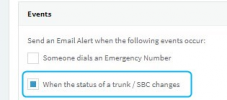
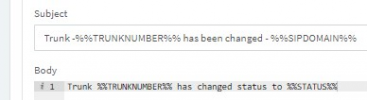
Are you referring to this email notification:
1644485330107.png
1644485423748.png

If yes, do you mean you're receiving a lot of notifications? If yes I'm not sure what you mean by "triggering too frequent alerts", it will trigger as many as needed depending on how frequently the SBC connection is dropping so if this is the case, I suggest looking into why the SBC connections are dropping.
 
Yes, this is this one, but these SBCs are behind stable DSL line, is thereany chance a Windows SBC behave differently from a Debian one ?
I noticed most of notifications are coming from different location but from windows SBCs, so if this common point is relevant do I need to search for something specific to windows?

I receive only trunk up notifications never down is this not a strange behavior, or is there a timeout you can increase not to receive a notification if only 2 packets are lost ?
 
Yes, this is this one, but these SBCs are behind stable DSL line, is thereany chance a Windows SBC behave differently from a Debian one ?
I noticed most of notifications are coming from different location but from windows SBCs, so if this common point is relevant do I need to search for something specific to windows?

I receive only trunk up notifications never down is this not a strange behavior, or is there a timeout you can increase not to receive a notification if only 2 packets are lost ?
Well, the actual SBC software is nearly identical, but obviously the biggest change between Windows and Linux SBC installations is the OS.
If everything happened around the same time, could it be something like Windows OS Updates that rebooted the server?
 
The SBC trunk alerts an "up" every time the SBC reconnects. It alerts "down" after as much as 5 minutes. So we get occasional "up" alerts from clients for momentary drops. I expect if you ping from that site to the Internet for an hour or two you'll see drops just before the time of the "up" alert. If multiple sites alert at the same time then it's likely the server end.
 
  • Like
Reactions: NickD_3CX
Of course WU is probably an option but , not sure at all, it can explain so frequent notifications on same day for example. My question is why only UP notifications if SBC cares on down time only after 5 mins could it be the same for UP time?

Other common point is my main cloud hoster which is AWS lightsail.
 
So glad to see your post about this. This alert is the only one I care about because it usually means either my phones are down or not (typically because our internet or power went down at the office). I got 26 emails on Tuesday in a somewhat short timespan and ALL of them said the status changed to up. Rather than alternating between down and up. So what, the status changed from up to up? Great, thanks for wasting my time.

The point for me and I assume for you as well is that we want to get alerts. But I don't want to get alert fatigue and basically have to think to myself oh these are just hiccups I have to ignore. I want an alert to actually be meaningful.

Btw, my SBC is running on windows.
 

Attachments

  • emails.png
    emails.png
    5.2 KB · Views: 3
the status changed from up to up
Your question may have been rhetorical, but as I mentioned the "up" alert triggers when the SBC connects. The down alert only triggers every 5 minutes or so, maybe after 5 minutes? So if you get a flurry of up alerts that would probably indicate packet loss or some other connectivity issue, and be useful to know if/when people complain about dropped calls, audio dropouts, etc.
 
  • Like
Reactions: NickD_3CX
Hi Steve, yes rhetorical. But if you look at my attachment you can see that many of these email alerts were literally only 1 minute apart. If your theory is correct about packet loss/connectivty etc, that's fine. But I believe it should be reporting a different notification. For a trunk/sbc alert I would really only want to know when the status is changed from the last reported status.
 
Right, so it was dropping and reconnecting that often. The alternative would be, I guess, only alert a maximum of one reconnect every 5 minutes? I'd expect a lot of "my trunk never went down but I can't make calls" posts. At least this way the admin has some idea there's a problem. It's a point of view and I'm not trying to argue with you. I guess I see it as a benefit, though a bit confusing until one understands why "down" emails aren't always sent.

I would guess their code has two paths to an alert: one on connection, and every 5 minutes something else checks to see if a trunk is disconnected. Checking for "down" every few seconds would waste CPU time 99.9% of the time. Especially if the SBC or trunk doesn't disconnect, it just drops, and the server doesn't know that it's disconnected yet.
 
I would be willing to test to see if that was the case, but just looking at my history, I feel as though I only get these notifications after business hours when I'm at home. If I happen to get one while I'm at the office then I'll try to report back here.

It would maybe be nice if they separated the trunk notification from sbc. Since lack of sbc doesn't prohibit all users from making calls, remote/app users etc.

And as aws2p suggested, maybe being able to customize this alert based a certain amount of packet loss and or down time, would be helpful. Or maybe only if the status is set to down.
 
I only get these notifications after business hours
Of course scenarios differ but our data center monitoring had a bunch of dropouts/warnings in spring 2020 around 6-9 pm most days. When I talked to them they said backbone traffic skyrockets after 5pm when people get home and watch streaming movies. As in, more than usual starting spring 2020. We're close enough to Chicago our data center routes through the main hub in the city. As I recall they were able to change some routing on their end to alleviate it somewhat, and we mostly ignored the rest since no one complained. It hasn't been a problem in quite a while now that I think about it.
 
I remain convinced that the UP detection is far too sensitive or the mechanism must be improved so that at least it does not send an UP notification when nothing has been Down just before.
This would avoid unnecessary bursts of UP notifications. Perhaps a timer almost set to 20 sec could eliminate fake alerts.
What do you think ?
 
I remain convinced that the UP detection is far too sensitive or the mechanism must be improved so that at least it does not send an UP notification when nothing has been Down just before.
This would avoid unnecessary bursts of UP notifications. Perhaps a timer almost set to 20 sec could eliminate fake alerts.
What do you think ?
Scenarios:
  • PBX 'loses' SBC for >5 minutes --> Sends a DOWN notification
  • PBX 'loses' SBC for <5 minutes --> Does NOT send DOWN notification
  • PBX detects a SBC reconnecting after it had lost it --> Sends a UP notification

By the time you know this information, you have all the information you need.
I find it very wrong for an admin to not want to receive a notification if the SBC went down even for 5 seconds. What happens if it goes down and up for 5 seconds 50 times in a day, I would want to know about that...

Now for the reason we don't send a DOWN notification for less than 5 minutes, this is precisely not to spam the admin, so we assume that <5 minutes, the UP notifications serves the purpose of notifying the admin that something went wrong.

Now for >5 minutes, at this point you don't know if the server will come back up, so we send a DOWN notification to give the admin the chance to potentially call their clients and say e.g. "hey, there is something wrong with the internet, tell your users to switch on LTE and connect with their mobile phones to their extensions to continue making/receiving calls", because if 5 minutes have passed, the internet may recover after 4 hours.


I think the frequency and logic behind this is very well thought and planned.
If you don't want to receive ANY notifications at all, go to Settings --> Email, and in notifications uncheck the "When the status of a trunk / SBC changes" option.
 
  • Like
Reactions: ChrisC_3CX
My goal of course is to be infomed about serious things like down time, otherwise, I will have already disabled that notification.
So If I understand properly pbx can send as many as "necessary" UP notifications for frames loss or packet loss if it's under 5 minutes, this is not spamming admin ??? well I don't see what is the logic for UP only , so why not sending SBC downtime with same speed and count real time spent in between?
This could be an interesting info on real amount of time link was lost.
If each alert is to send few seconds of sbc loss then is it something really usefull ? it can be so much things in between the PBX and SBC you have no control on to explain small loss.
 
So If I understand properly pbx can send as many as "necessary" UP notifications for frames loss or packet loss if it's under 5 minutes, this is not spamming admin ???
No, you need to know if your internet line is "flapping", because I will argue that this is worse that the internet line going down and staying down for 2 hours.

well I don't see what is the logic for UP only , so why not sending SBC downtime with same speed and count real time spent in between?
TCP connections, are not dropped immediately if you pull the cable or the internet drops, so it *could* be up to 30 seconds after the event, so for <1 minute disconnections this statistic would be useless. For longer ones you could argue this, but you already know a "long" disconnection has happened if you get a DOWN notification.

If each alert is to send few seconds of sbc loss then is it something really usefull ? it can be so much things in between the PBX and SBC you have no control on to explain small loss.
Exactly, it can be many things, so the admin needs to know there is a problem, so yes, see my first point.


As I said above, this specific process was pretty well thought over. Could it be improved? Everything can be improved, but sorry, I do not agree with a statement that it's "triggering too frequent alerts". I explained my reasoning above.
 
Ok Thanks Nick for detailled answers, have a good end of day;)
 
  • Like
Reactions: ipt_dude
  • Like
Reactions: ipt_dude
Status
Not open for further replies.

Forum statistics

Threads
111,974
Messages
590,081
Members
164,899
Latest member
mazet