


- Joined
- Jan 9, 2014
- Messages
- 5,077
- Reaction score
- 1,096
Hello,
I tested scheduled backups on AWS-S3 , in 3CX, backups are set to be done each monday night and this during 6 weeks rotation and then new backup scratch the oldest. So each week backup files stored are renamed from .zip (newest) to .5.zip (oldest). Until now i was using my FTP server to save the backups and files horodatage never changed even with 3cx renaming the existing files.
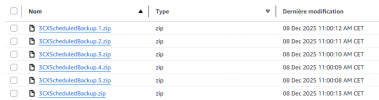
Now on AWS S3 it behave differently as each time a new backup is done, all the files are saved at same latest date and hour with only 1sec time space in between. Do you know if this is a normal behavior? or something I missed in AWS settings to keep the initial date and time, even the files are weekly renamed?
here an example
I tested scheduled backups on AWS-S3 , in 3CX, backups are set to be done each monday night and this during 6 weeks rotation and then new backup scratch the oldest. So each week backup files stored are renamed from .zip (newest) to .5.zip (oldest). Until now i was using my FTP server to save the backups and files horodatage never changed even with 3cx renaming the existing files.
Now on AWS S3 it behave differently as each time a new backup is done, all the files are saved at same latest date and hour with only 1sec time space in between. Do you know if this is a normal behavior? or something I missed in AWS settings to keep the initial date and time, even the files are weekly renamed?
here an example


