Hi,
I think you have the gist of it.
Summary
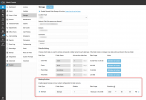
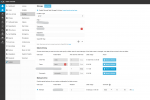
1. Backup Frequency and Retention Settings:- For SFTP backups in 3CX, you can schedule backups to occur "Hourly", "Daily", or "Weekly". You can also set a backup rotation, which determines the number of backups to keep before overwriting the oldest one.- The "Auto-archive older than" field is used for managing the retention of recordings, voicemails, and other non-configuration data. This setting allows you to specify the number of days after which these items should be archived.
2. Limitations for Non-Configuration Backups:- The frequency and retention settings specifically for non-configuration backups like chat, fax, recordings, and voicemails are not as flexible as those for configuration backups. The primary method for managing these is through the "Auto-archive older than" setting.In summary, while you can schedule the frequency of backups and set retention policies for configuration backups, non-configuration backups rely on the "Auto-archive older than" setting for retention management.
Even more summary - Anything that's "Archive" doesn't get rotation - if you need to delete old items of those types you should use other means - OS scheduled tasks for example.