Screen Share

Status
Not open for further replies.

George Leslie

Trainee Partner
Joined
Jul 22, 2020
Messages
2
Reaction score
0
Is it possible/ is there going to be any functionality which allows the organiser of a webinar to have a floating/ pop out panel of their attendees so they can still see their attendees, but without the attendees seeing themselves in the screen share?
Many thanks
 
Is it possible/ is there going to be any functionality which allows the organiser of a webinar to have a floating/ pop out panel of their attendees so they can still see their attendees, but without the attendees seeing themselves in the screen share?
Many thanks
Not really possible since it is Web-based, unlike Zoom which does that.
 
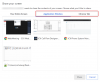
Rather than sharing the screen itself, you can share the application or a specific browser tab.
Then the participants will be able to see only the shared content.

1597324708823.png
 
Rather than sharing the screen itself, you can share the application or a specific browser tab.
Then the participants will be able to see only the shared content.

View attachment 17453
Not exactly what he asked for. That he probably already knows.
 
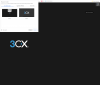
With the new Webmeeting interface which we are testing (You can experience the new interface via one of the 3CX Webinars - https://www.3cx.com/blog/event-trainings/ ) the participant list disappears when you activate screen, application or chrome tab sharing

1597325581895.png
 
  • Like
Reactions: NicholasP_3CX
Status
Not open for further replies.

Forum statistics

Threads
111,973
Messages
590,078
Members
164,896
Latest member
sameage