Solved Script Issues

Status
Not open for further replies.

Rhys Haskell

Advanced Certified
Joined
Jul 30, 2018
Messages
314
Reaction score
74
Hi,

Does anybody have any idea on how to get around the below:
1637139134875.png

Thanks,
Rhys
 
  • Like
Reactions: Evolute IT
Open the content of the ps1 file in notepad++ and copy all lines.
Then run the commands via the windows terminal (link below if you don't have it) to see what happens before this line

https://www.microsoft.com/en-us/p/windows-terminal/9n0dx20hk701
Hi Stefan,

Thanks for this, running the commands on their own didn't throw up any errors. Although, I now have a different issue with not being able to integrate with a Teams Room.

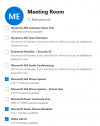
The MS user has, 365 Phone System, E1 and Teams Room license:
1637159550938.png

On 3CX it shows synced with Microsoft 365 but not Teams:
1637159583733.png

This has had direct routing setup in the past so it deffinatly is possible wth other solutions.

Any ideas?
 
Did you work your way through the FAQs already?

https://www.3cx.com/docs/microsoft-teams-integration-faqs/
Hi Stefan,

I went through everything that looked relevant.

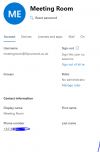
The user shows that the phone system is on:
1637161188170.png

The user has a DDI in E164 format:
1637161245099.png

I have just had another read through and cant see any reason this wouldnt work, we not have it setup and working on other 365 users. The only difference is we have E3+Phone System and we have assigned this user E1+Phone System+Teams Room.
 
  • Like
Reactions: StefanW
Status
Not open for further replies.