Search MAC in now (users) former called Extensions, not longer seems to work

Status
Not open for further replies.

Musarano

Bronze Partner
Joined
Oct 8, 2020
Messages
9
Reaction score
0
Hi.

I have noticed that coping the MAC (any) from the tooltip under PHONES section, to search it over Users (Extensions), is not longer working.

That was an incredible help to identify to whom that disconnected (by any means) belonged to, so action can be taken.

Now, the function seems to be not longer working... How can this be workarounded?
Is it maybe a bug? or was it at purpose?

Please, help. We have hundreds of extensions and devices to handle.

Thank You
 
Last edited:
Thank You VasilisV

I have 1 phone attached for extension, still not showing when searching. So that means, that from V18.0 (1880) we will not be able to search no more?

Is that it, anyideas or reasons in why this "step backwards", because going the export to csv way complicate, slowdown and makes things harder or even more difficult to achieve certain tasks in a timely manner..

Its is just my humble opinion.

Thanks for answering.
 
Thank You VasilisV

I have 1 phone attached for extension, still not showing when searching. So that means, that from V18.0 (1880) we will not be able to search no more?

Is that it, anyideas or reasons in why this "step backwards", because going the export to csv way complicate, slowdown and makes things harder or even more difficult to achieve certain tasks in a timely manner..

Its is just my humble opinion.

Thanks for answering.
If you're searching for a phone, you can just click it in the Phones section and it will bring you to the extension.

I agree that this search was useful but it was only working when 1 phone was added. If an extension had 2 or more, it wouldn't work anyway. So they removed it completely to avoid confusion.
 
Thats the issue,
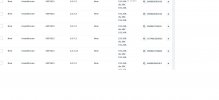
That there is nothing to click to action. In our case, we will need to know, to whom extension #, that "orphan popup phone" belonged to or suppossed to, OR is it just a real new phone that needs to be assigned to an extension.

Example:
 

Attachments

  • 3cxphones.jpg
    3cxphones.jpg
    68.2 KB · Views: 6
If they show up like that (in bold), it's that they are either not supported (unassignable) or not assigned at all.

Otherwise, once registered, it will show up in normal text along with the ext number on the left. Clicking it will bring you there.
 
Thank you Frederick, that what we do with the ones registered, that we have no need of search on Users.
Its this cases of when the extensions gets either:
disconnected for some reasons: power loss, user turned it off and went for the weekend, and upgrade process, or like you say, its a new extension needing to be assigned. But that is precisely the case, we not sure, and with the search in Extensions (Now Users) we could find out very fast, by just refferencing on it by the copy paste of the MAC in Phones section. We have more than 280+ phones, and this situation now, makes things difficult for us now. Hope this takes in consideration or at least a better workaround than an export, in the near future..

Thank You!

PS: Or, is it possible to downgrade the version and keep it?
 
Hi @Musarano,

You can downgrade back to v16 within 30 days of the upgrade. You'll need to have a v16 backup when installing v16 again. Note that this would be a temporary step as eventually as time goes on, v16 will reach EOL and v18 will be the standard going forward.
 
  • Like
Reactions: Evolute IT
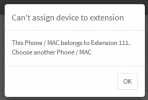
Alternatively @Musarano , when you get a bold IP Phone entry there, you can try and assign it to an extension you want. If the MAC Address though of the phone is already configured to another extension, then you will get a popup telling which extension has this MAC configured:
1632229894337.png
 
  • Like
Reactions: Evolute IT
Status
Not open for further replies.

Forum statistics

Threads
112,349
Messages
592,027
Members
165,513
Latest member
megalmazan