Server Error Issue accessing management console

Status
Not open for further replies.

AEGIS_SEC_SOL

Silver Partner
Basic Certified
Joined
Oct 21, 2019
Messages
27
Reaction score
3
Hi all, I was trying to upgrade the 3CX instance hosted on amazon lightsail to the V18, the update failed and is now giving me server error while trying to log into the management console. I get an email saying
The following service(s) were interrupted:
3CXPhoneSystemMC01

I tried restarting it, but it wouldn't. Any suggestions?
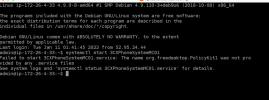
Also, I downloaded the backup to my Mac before the upgrade attempt. Does the backup need to be a zip file or what type of extension does it need to be to upload while deploying from backup.When I connect using SSH and try restarting 3CXPhoneSystemMC01 service, it give me the message as the attached screenshot.
 

Attachments

  • Screen Shot 2022-01-11 at 1.50.52 AM.png
    Screen Shot 2022-01-11 at 1.50.52 AM.png
    235.4 KB · Views: 7
Run

Code:
systemctl status 3CX*

to see what's running or not running.

Start any that are not.

You may need to use sudo.

Code:
service 3CXCfgServ01 start
service 3CXPhoneSystem01 start
service 3CXSystemService01 start
service 3CXEventNotificationManager start
service 3CXQueueManager01 start
service 3CXTunnel01 start
service 3CXIVR01 start
service 3CXMediaServer start
service 3CXCfgServ01 start
service 3CXPhoneSystemMC01 start
service nginx start

the backup for 3CX is in ZIP format.

though, sounds like it may have gone wrong during an upgrade and some files could be missing.
 
If you can't figure out what the issue is and you feel you're wasting too much time on it, you might actually want to consider deploying a new machine especially since you have a backup which you can now use to deploy via our new customer portal deployment wizard.

This should not take more than 30 minutes (depending on the backup file of course) and you'll also be starting with a new Debian 10 machine resulting in a cleaner installation.
 
  • Like
Reactions: AEGIS_SEC_SOL
Run

Code:
systemctl status 3CX*

to see what's running or not running.

Start any that are not.

You may need to use sudo.

Code:
service 3CXCfgServ01 start
service 3CXPhoneSystem01 start
service 3CXSystemService01 start
service 3CXEventNotificationManager start
service 3CXQueueManager01 start
service 3CXTunnel01 start
service 3CXIVR01 start
service 3CXMediaServer start
service 3CXCfgServ01 start
service 3CXPhoneSystemMC01 start
service nginx start

the backup for 3CX is in ZIP format.

though, sounds like it may have gone wrong during an upgrade and some files could be missing.
service 3CXPhoneSystemMC01 is the one that is not running, tried restarting it but did not work.
 
If you can't figure out what the issue is and you feel you're wasting too much time on it, you might actually want to consider deploying a new machine especially since you have a backup which you can now use to deploy via our new customer portal deployment wizard.

This should not take more than 30 minutes (depending on the backup file of course) and you'll also be starting with a new Debian 10 machine resulting in a cleaner installation.
Chris, I tried to reinstall via the new portal but when I upload the backup it says invalid. the backup I took is on a Mac, I tried converting it to a zip file with winzip and tried it again, it still says invalid. Any thoughts?
 
Chris, I tried to reinstall via the new portal but when I upload the backup it says invalid. the backup I took is on a Mac, I tried converting it to a zip file with winzip and tried it again, it still says invalid. Any thoughts?
What do you mean converting to a ZIP? It downloads as a ZIP
 
What do you mean converting to a ZIP? It downloads as a ZIP
for some reason after it downloads as zip, it I believe automatically unzips and shows as a regular folder. I am using the latest MacOS.
 
for some reason after it downloads as zip, it I believe automatically unzips and shows as a regular folder. I am using the latest MacOS.
It should download in your downloads folder a a zip, if you're clicking it you may just be going inside of the zip
 
I've come across this before, if I'm not mistaken there is a setting in safari that automatically extracts the archive.

Have you confirmed that only the Management Console service is not running?

You could try creating a new backup via CLI: https://www.3cx.com/docs/backup-restore-command-line/
 
is it easier to create a new instance from the snapshot in Lightsail?
This I'm afraid I can't confirm because it's Hosting Provider territory. As I understand it, a snapshot of the machine would in theory spawn the exact same machine with it's current configuration so you would still have the problem.

Do you not have another backup file? You could check in the default backup directory of the PBX for any recent backups. The default directory is
/var/lib/3cxpbx/Instance1/Data/Backups

By the way, here's how to disable the option in Safari: https://www.3cx.com/community/threads/v16-to-18-failed-on-raspberry-pi.85905/#post-404391
 
Status
Not open for further replies.

Forum statistics

Threads
111,974
Messages
590,083
Members
164,901
Latest member
Silent_Guru