Solved Server move - Instance Manager 3CX offline

Status
Not open for further replies.

tropicsoftde

Gold Partner
Basic Certified
Joined
May 4, 2015
Messages
47
Reaction score
13
Hi,
a few days ago I moved a customer installation to a new server. Now this instance is shown as offline "3CX offline - Machine is not reachable".
But I cannot activate the 3CX Instance Manager in the new install. This field no longer exists.

Server self hosted (Debian) -> self hosted (Debian)
32SC PRO 16.0.8.9
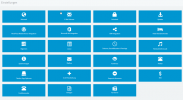
2021-07-08 15_14_51-3CX Phone System Management Console.png

Jan
 
@tropicsoftde may I ask how you installed this PBX and at which platform ?
Also, are you sure 100% that the new machine is Linux and not Windows on the background ?
 
Installation console
http://downloads-global.3cx.com/downloads/debian stretch main
OS: Debian GNU/Linux 9.13 (stretch) x86_64

everything works fine - just not the Instance Manager
If that doesn't work, no problem. I (and the customer) can live with that.
 
Would you happen to have enabled "Failover" from the Management Console --> Backup and Restore?

If failover is enabled, the Instance Manager option goes away.
 
No, no failover.
I made a full backup, created a new server and imported the backup during the install - takes around 5 minutes with FQDN
 
STOP!
Command back. I am an idiot.
I am not logged in as admin, but only as a user with full rights. Now I see the Instance Manager.
sorry for the circumstances
 
  • Like
Reactions: NickD_3CX
Glad you figured it out!!!

Can happen to the best of us! :)
 
Status
Not open for further replies.

Forum statistics

Threads
111,974
Messages
590,081
Members
164,899
Latest member
mazet