Set Up different hours to dummy extension

George Stavrianos

Customer
Joined
Apr 28, 2020
Messages
73
Reaction score
7
Hello to all,

i have a question about digital receptionist.

I created an inbound rule, which is the main number for our company and seted up specific hours (09:00 AM- 17:00 PM). This inbound rule is routed to an IVR , where after these hours the technical support department is accepted calls until 20:00 PM.

My question is how this IVR can be to stop the calls for technical department after 20:00PM and after this hour the call would be ended.

My thought is to create a dummy extension to route there the inbound rule, but i don't know how to set up the hours after 20:00 PM to end the call.

Thanks
 
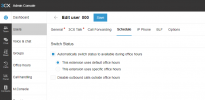
To set up office hours for a user in Version 18, you will have to log in through the Admin console of the web client, not the management console, and here you will see the Schedule tab which allows you to configure your hours.

1727878449670.png
 
Hi thanks for your answer,

and how can stop the call after the specific hour 20:00 PM? Because the call center is closed to 17:30 PM, and after 17:30 customers are informed that the technical department answer the calls until to 20:00PM. but now if someone press the choise 2 after 20:00 PM the call routes to technical department. So I want to end the call when someone call after 20:00 PM.

Thanks again
 
In Version 20 this is easy to achieve with the Department Office hours, so you can define office hours and have each system extension do its own routing. It is a lot more refined in Version 20.

However in Version 18 you will need to use your inbound rule hours for the IVR, then after hours, have it route to the dummy extension and have its hours defined separately.
 
In Version 20 this is easy to achieve with the Department Office hours, so you can define office hours and have each system extension do its own routing. It is a lot more refined in Version 20.

However in Version 18 you will need to use your inbound rule hours for the IVR, then after hours, have it route to the dummy extension and have its hours defined separately.
Ok i Understand this but i have problem about dummy extension. The diagram which is worked now is
Inbound Rule 09:00 - 17:30--> IVR, with choise to select 2, so the call routes to technical department , but i have not office hours to stop the call after 20:00PM.

So the solution is to create a dummy extension, but after 17:30 must be existed the IVR (after hours) which has the choise to route the call to thechnical department but until 20:00. After 20:00 PM, how to make to exist the after hour IVR but don't route the call to technical department?

So i want to create the below diagram

1) 09:00 - 17:30 Office hours
2) 17:30 --> IVR non working hours, but there is a choise where if someone press 2 the call routes to technical department
3) I want to exist both of them, but after 20:00 PM, when someone press the choise 2 the call will be ended

Thanks
 
Last edited:
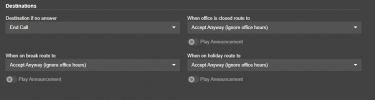
It is a lot simpler in Version 20 where each department can have its own office hours, and each Queue, Ring Group and Digital receptionist can be added into these departments. They then have their own method of routing during breaks, holidays and out of office hours

1727937432762.png

Bu in Version 18 you will have to send it to a different dummy extension which will have its own office hours and exceptions to do the routing.
 
The problem is that i want to exist the inbound rule with its hours, but i don;t know how to set up the hours to dummy extension where if the call is made until 20:00 , then the call routes to technical department, otherwise the call will be ended.

Thanks
 
The hours of a dummy extension are set in the Schedule tab of the web client Admin console.

You will have to log in as an admin extension on the FQDN.3cx.gr/webclient to do this. This is NOT available in the Management Console.

Please see my first reply to see the screenshot.
 
  • Like
Reactions: Evolute IT
Ok i found where i can set up the dummy extensions hours. But i want your help for how i think tou set upo the IVR.

1) So the inbound rule remains as is, with working and non workinh hours correct?
2) After non working hours of inbound rule, route the call to the dummy extension, correct?
3 I Set up the office hours and if the call made up until 20:00PM then we route this call to IVR which has the choise 2 to connect with technical department, and if the call made up after 20:00PM then the call will ended. How can do this step, where are the settings?
 
An extension will route the call to its forwarding destinations set in the following way:

AVAILABLE: During office hours
AWAY: During break times
DO NOT DISTURB: After office hours

You can also have additional routings with the exceptions.

You should already have the option "Automatically switch status to available during office hours" With this active, it will automatically switch and route the calls accordingly depending on the status which is active.
 
Ok, but i have no the ability to "call forwading" tab to choose the IVR which i want , but only extensions
 
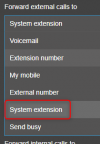
Select System Extension

1727947676417.png
 
this step can be done from web client admin cosnsole or for user web cleint?

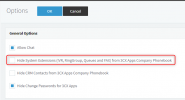
because if i chhose fro the admin web console "system extension" is not appear the number of IVR and generally does not appear the IVRs extensions
 
Last edited:
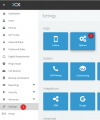
You may have the system extensions hidden that means

1727948971098.png

1727948996636.png
 
so this must be done for web admin console?
 
ok i found it, so i will create the diagram and routing and i will come back to inform you.

SO, to the inbound rule it is no needed it to set up hours , becuase is routed to the dummy extensions, correct?

Thanks for you help
 

Forum statistics

Threads
111,954
Messages
589,922
Members
164,852
Latest member
priya