- Joined
- May 18, 2023
- Messages
- 19
- Reaction score
- 6
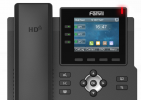
I am setting up my first client with 3CX, Voxtelesys SIP trunk, & Fanvil X4U-V2 & X3U Pro phones. Couple questions about setting up the line keys.
I have 3 DIDs at the moment. DIDs are assigned to Office Hours, which is assigned to a Queue and the users are all part of the queue.
Using the Web Client (I am System Owner)
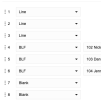
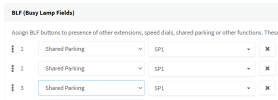
In the BLF tab of each extension, I have it set as follows:

4, 5, 6 seem to work as expected on each phone (X4U only, X3U does not have secondary display).
It displays the persons name on the secondary panel (X4U), and calls the extension of the person specified. Works as expected.
On the Main display: 1, 2, 3, shows a phone icon and the extension number of the phone for each of the three line labels. No DID related info.
LEDs for each button shows green when available, and red when on a call...all good.
Only having my cell phone and Skype on my computer as external phones, I experimented by placing one call from Skype to one DID, and picked that up on an extension (101). While on that call the top line button is red. All other extensions in the group...all lights are green (no indication that a line / DID is busy). On the X4Us, for other extensions the secondary display does show red for ext 101...that seems correct.
I then place a second call from my cell to the second or third DID. Ext 101 shows no indication of a second call but I can hear it ringing there.
All other extensions (in the group) top line light blinks green, and I can pickup the second call there.
On ext 101 I could pickup the second call only after I hung up the first call. Could not put the first call on hold to answer the second call as there is no indication of an incoming call on line keys 2 or 3. I can however, put the first call on hold, click line key 2 or 3 and make an outgoing call to my cell phone. Top line blinks yellow while I am on that second call. That seems correct as well.
Q1: I was expecting each line key to be related to a DID. So I thought a second call to DID 2 or 3 would show on line key 2 or 3.
On no phone does the second or third line keys show activity for an incoming call regardless of DID, always just the first line key.
Is there a way to make this relation? Maybe I am missing something?
Q2: For Ext 101, is there no way to put the first call on hold, and pick up the second incoming call (again no indication of second incoming on that extension).
Q3: Do you have to set the BLF options on each extension individually? I don't see any option to set them at a more global level. What If I had 50+ phones to do?
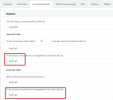
Q4: For all outgoing calls, the number displayed on the receiving end is always the main truck number. I think I read that somewhere in my training.
I hope my presentation of the issue is clear enough. Piece of cake for all of you more experienced users.
Thanks in advance.
LThibx
I have 3 DIDs at the moment. DIDs are assigned to Office Hours, which is assigned to a Queue and the users are all part of the queue.
Using the Web Client (I am System Owner)
In the BLF tab of each extension, I have it set as follows:
4, 5, 6 seem to work as expected on each phone (X4U only, X3U does not have secondary display).
It displays the persons name on the secondary panel (X4U), and calls the extension of the person specified. Works as expected.
On the Main display: 1, 2, 3, shows a phone icon and the extension number of the phone for each of the three line labels. No DID related info.
LEDs for each button shows green when available, and red when on a call...all good.
Only having my cell phone and Skype on my computer as external phones, I experimented by placing one call from Skype to one DID, and picked that up on an extension (101). While on that call the top line button is red. All other extensions in the group...all lights are green (no indication that a line / DID is busy). On the X4Us, for other extensions the secondary display does show red for ext 101...that seems correct.
I then place a second call from my cell to the second or third DID. Ext 101 shows no indication of a second call but I can hear it ringing there.
All other extensions (in the group) top line light blinks green, and I can pickup the second call there.
On ext 101 I could pickup the second call only after I hung up the first call. Could not put the first call on hold to answer the second call as there is no indication of an incoming call on line keys 2 or 3. I can however, put the first call on hold, click line key 2 or 3 and make an outgoing call to my cell phone. Top line blinks yellow while I am on that second call. That seems correct as well.
Q1: I was expecting each line key to be related to a DID. So I thought a second call to DID 2 or 3 would show on line key 2 or 3.
On no phone does the second or third line keys show activity for an incoming call regardless of DID, always just the first line key.
Is there a way to make this relation? Maybe I am missing something?
Q2: For Ext 101, is there no way to put the first call on hold, and pick up the second incoming call (again no indication of second incoming on that extension).
Q3: Do you have to set the BLF options on each extension individually? I don't see any option to set them at a more global level. What If I had 50+ phones to do?
Q4: For all outgoing calls, the number displayed on the receiving end is always the main truck number. I think I read that somewhere in my training.
I hope my presentation of the issue is clear enough. Piece of cake for all of you more experienced users.
Thanks in advance.
LThibx