


- Joined
- Oct 16, 2019
- Messages
- 12
- Reaction score
- 2
Hi,
I’m having difficulty with the setupconfig.xml installation on a new 3CX test system. The 3CX ISO image I'm using to install is version 16.
I’m getting this error, and I don’t understand why.
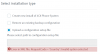
"Error in XML file. RequestCode = ‘Country’: Invalid option selected”
There is no “RequestCode” field for me to change.
I have tried changing the Country option to no effect either (I'm based in Canada).
<option>
<code>Country</code>
<!--Country name from here http://www.3cx.com/wp-content/uploads/2016/11/Time-Zone-Sheet1-1.pdf -->
<answer>CA</answer>
</option>
I have successfully deployed a 3CX system back in December using the XML file, so I’m not sure what went wrong here.
If anyone who has some insight on this, it would be greatly appreciated. (Yes I have read through the 3CX documentation on using the XML file to install 3CX)
This is the error:
This is the part of the installation that fails:
Thanks,
Daniel
I’m having difficulty with the setupconfig.xml installation on a new 3CX test system. The 3CX ISO image I'm using to install is version 16.
I’m getting this error, and I don’t understand why.
"Error in XML file. RequestCode = ‘Country’: Invalid option selected”
There is no “RequestCode” field for me to change.
I have tried changing the Country option to no effect either (I'm based in Canada).
<option>
<code>Country</code>
<!--Country name from here http://www.3cx.com/wp-content/uploads/2016/11/Time-Zone-Sheet1-1.pdf -->
<answer>CA</answer>
</option>
I have successfully deployed a 3CX system back in December using the XML file, so I’m not sure what went wrong here.
If anyone who has some insight on this, it would be greatly appreciated. (Yes I have read through the 3CX documentation on using the XML file to install 3CX)
This is the error:
This is the part of the installation that fails:
Thanks,
Daniel


