ShaPoint backup issue

TGPL

Customer
Joined
Nov 21, 2023
Messages
2
Reaction score
1
Hi all,

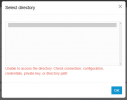
I'm trying to configure backups to SharePoint and getting the error below.
M365 is connected and working well. It's the first time I'm trying to set up SharePoint and I just updated to v20.
The SharePoint default site is one of the old ones (classic experience) and we can't change this at the moment.
Does anyone know if this is supported?

Also, the instructions are not very clear if the folder that we create has a specific name or if we will be able to pick from existing folders.

Cheers,

C
1741205341478.png
 
  • Like
Reactions: Albert-Jansen
I experienced the same error. I attempted to reconfigure the integration, but it did not resolve the issue.
 
Regarding your question, SharePoint integration with 365 requires the root SharePoint site to be used and no other.

Here are all the points that need to be adhered to for this work

The integration needs to have been done using the new automatic method and the 365 global admin account. This account is also licensed in 365 to a 365 license, which includes SharePoint, and the 365 global admin has the SharePoint admin rights assigned. Please.

If so, please check that the folders are created on the communication site. The default site was created by default, not the one that you made after.

attachment


Click the document section of the site called Communication Site.
attachment


The section that contains this is now under the System > Storage section

attachment
 
  • Like
Reactions: Evolute IT
Regarding your question, SharePoint integration with 365 requires the root SharePoint site to be used and no other.

Here are all the points that need to be adhered to for this work

The integration needs to have been done using the new automatic method and the 365 global admin account. This account is also licensed in 365 to a 365 license, which includes SharePoint, and the 365 global admin has the SharePoint admin rights assigned. Please.

If so, please check that the folders are created on the communication site. The default site was created by default, not the one that you made after.

attachment


Click the document section of the site called Communication Site.
attachment


The section that contains this is now under the System > Storage section

attachment

The installation is clear to us, we have had it working before on this PBX, but since last night it stopped working.
 
The installation is clear to us, we have had it working before on this PBX, but since last night it stopped working.
In that case, you must check what has changed, as there are no issues with 3cx with 365 integration and SharePoint. Consider reconfiguring the integration from under the Integrations > 365 section.
 
  • Like
Reactions: Evolute IT
In that case, you must check what has changed, as there are no issues with 3cx with 365 integration and SharePoint. Consider reconfiguring the integration from under the Integrations > 365 section.
We are experiencing the following issue within 3CX: we are unable to make a backup to SharePoint in our environments that are not "Hosted by 3CX" . The environments that we do have "Hosted by 3CX" are able to make backups to SharePoint, see below for the error message we are receiving and what we have done.

Problem: 3CX backups via SharePoint (Microsoft 365) fail with error messages such as:
  • "Resource not found for the segment 'root:'"
  • "Unable to retrieve current list of backups. Please try later."
  • "Unable to access the directory. Check connection, configuration, credentials, private key, or directory path."

Actions taken:
  • Re-established connection with Microsoft 365
  • Did not change the folder structure in SharePoint
  • Error continues to occur when retrieving backups or executing a new backup
 
You may need to check with Microsoft for any potential issues on the SharePoint side, as this was previously working and has since stopped. A service outage on their end may prevent the backups from being recognised.
 
  • Like
Reactions: Evolute IT