Solved Shared Park not showing Active Status [Solved]

Status
Not open for further replies.

pact

Gold Partner
Advanced Certified
Joined
Dec 16, 2009
Messages
301
Reaction score
83
Has anyone identified a way for the Windows Softphone to display the active status of the Shared Park's in the BLF side panel?

They just always stay grey, so you cannot tell where someone has parked a call.
 
Hi YiannisH,

Yes we are using the Standard and Pro editions.

We have identified (with the help of 3CX Support) the short fall.

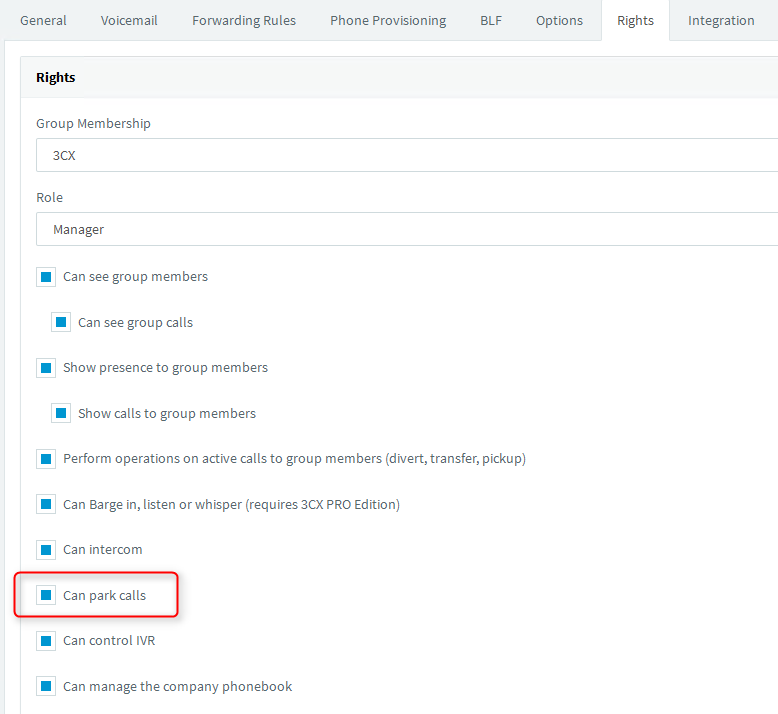
In the extensions 'Rights' there is a checkbox for 'Can Park Calls'. (Which is odd, as all extensions can already park and retrieve calls).

But once this was enabled the SoftPhone then showed the active status of the Park and worked correctly :)

CD1YGpHHfkrzfIMwwltU-N9HyX_YKoOsRA.png
 
Glad to hear you resolved your issue. Thanks for sharing your solution
 
Status
Not open for further replies.