SharePoint showing empty for backup location

Status
Not open for further replies.

jamiewelchoit

Silver Partner
Advanced Certified
Joined
Apr 24, 2023
Messages
4
Reaction score
0
Hi all,

Long time lurker here on the forums. Got my first strange issue. We have around 20 3CX instances and all have connected to O365 fine and we use Sharepoint as the backup locations. But we have one that is proving awkward so wondered if anyone has any suggestions.

When choosing it I just get an empty folder list, even though there are folders on the site. Clicking the up arrow doesn't show anything else
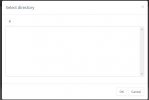
SelectDirectory.JPG

Integration is setup and can see users etc fine.
I have removed the integration from Entra and reconfigured it and the same happens.
Global Admin has full owner rights over the Sharepoint site
SharePoint site is the default one that is created when the tenant is created.
I have created a 3CX folder in the site and everyone currently has permission to see it, but there are other existing folders in there that aren't shown.
 
Does your global admin account used for the integration also have a 365 license assigned that includes a sharepoint license?

Additionally was the integration with 365 done using new automitic method and permissions ticked to allow integration with sharepoint?
 
  • Like
Reactions: Evolute IT
Does your global admin account used for the integration also have a 365 license assigned that includes a sharepoint license?

Additionally was the integration with 365 done using new automitic method and permissions ticked to allow integration with sharepoint?
I just tried removing it all and using a licensed global admin and same issue sadly.

This was done using the new automatic method, it pulls user lists and stuff through fine. It just seems SharePoint is the issue.
 
Can you please provide a screenshot of where the folders are configured on the SharePoint site?

Ensure that they are under the Default configuration.
 
Can you please provide a screenshot of where the folders are configured on the SharePoint site?

Ensure that they are under the Default configuration.
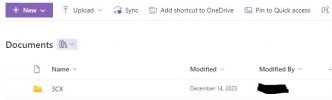
This is under the default main site and under the default documents folder. There are other folders under here, 3CX is at the top because it is alphabetical. The modified by user is the global admin that created it.Folders.JPG
 
I also am getting this issue trying to setup sharepoint in V20. Despite admin consent given and being the global admin and having a full sharepoint licence. The path always stays blank. you cant enter in a URL it seems its looking for something to populate and I cant see where this is.
 
The folders that are created to store the backups or achieved recordings must be under the default configuration site.

Find your root SharePoint site. Check the URL column to find the site that has the URL https://[domain].sharepoint.com → Click on the root SharePoint site link.

  • Only the root SharePoint site can be used at the moment

https://www.3cx.com/docs/manual/sharepoint/
 
Your right. A folder had to exist first for it to show up. I was looking to paste in the root sharepoint url. Its a little confusing in the gui that’s all
 
  • Like
Reactions: Evolute IT
The folders that are created to store the backups or achieved recordings must be under the default configuration site.

Find your root SharePoint site. Check the URL column to find the site that has the URL https://[domain].sharepoint.com → Click on the root SharePoint site link.

  • Only the root SharePoint site can be used at the moment

https://www.3cx.com/docs/manual/sharepoint/

The site that I am trying to use is the root site, and the folders have been created in the main documents folder but it still shows up empty for me.
 
Something very similar I was fighting with recently. Well, I had to check all the folder permissions inside SharePoint for it. As I see, sometimes minor tweaks in settings can do the trick.What I've learned is that while checking out the various options with respect to backups, the Cloud Backup for Google Workspace is worth a look. I've learned that it's always worth to have a secondary plan. You can read the info about backups here: https://loopbackup.com/cloud-to-cloud-backup-for-google-workspace/. Basically, I found them helpful to save all my data, but it's up to you. I suggest using them in the case when you are unsure about your further steps.
 
  • Like
Reactions: UrielFoster
Status
Not open for further replies.

Members Online Now

Forum statistics

Threads
111,832
Messages
589,278
Members
164,662
Latest member
DejanMDS