Skipping users in Queue

mm12th

Premier Customer
Joined
Oct 23, 2024
Messages
2
Reaction score
0
Since upgrading to v20 we have had a recurring issue with our main queue. All our agents are logged in to the queue, but it will not ring to some of them. The call will sit in the queue till it times out and then rolls to our overflow. Only thing I have been able to get to resolve it is unassign that extension and give the agent a new one.

Tried removing them from the queues and readding with no luck. Any ideas?

We are on v20 update 3
 
You should up your logging and then download the support log info to review the queue manager log to see whats happening.

You could also check the agent log in report.
 
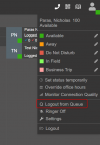
First, check that they are actually logged in to the queue.

Here we can see that the user is showing as being logged in to the queue

1729758127889.png

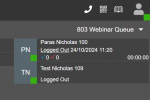
However, they actually are not logged in to the queue as they have selectively (been) logged out.

1729758177227.png

Think of the 1st screenshot login button as a light switch, and the 2nd screenshot logged out link as the fuse to the circuit. If the fuse is out, no matter how many times you turn the light switch on it will not have power to light up the bulb.

Secondly, check your wrap up time. These agents might be in wrap up time, and if it is for an extended period of time, you may have too much wrap up time configured for the queue.

Wrap up time is honoured across all the queues an agent is in.

If an agent is part of 2 queues for example:

Queue A has 300 seconds wrap up time
Queue B has 40 seconds wrap up time

When an agent finishes a call with a caller in Queue A, then for 300 seconds their phone will NOT ring for either Queue A or queue B.
 
First, check that they are actually logged in to the queue.

Here we can see that the user is showing as being logged in to the queue

View attachment 44719

However, they actually are not logged in to the queue as they have selectively (been) logged out.

View attachment 44720

Think of the 1st screenshot login button as a light switch, and the 2nd screenshot logged out link as the fuse to the circuit. If the fuse is out, no matter how many times you turn the light switch on it will not have power to light up the bulb.

Secondly, check your wrap up time. These agents might be in wrap up time, and if it is for an extended period of time, you may have too much wrap up time configured for the queue.

Wrap up time is honoured across all the queues an agent is in.

If an agent is part of 2 queues for example:

Queue A has 300 seconds wrap up time
Queue B has 40 seconds wrap up time

When an agent finishes a call with a caller in Queue A, then for 300 seconds their phone will NOT ring for either Queue A or queue B.
Thanks for the response. I have verified this agent is logged into the queue. We have wrap up time set at 10 seconds, and all other agents are able to receive calls as normal.
 
It would not be the first time where I have found it necessary to delete an extension and recreate the extension to solve a problem.
 

Forum statistics

Threads
111,955
Messages
589,926
Members
164,855
Latest member
parik24pro