SMB - Twilio SIP Trunk - Calls Forbidden

matthew20687

SMB User
Joined
Jan 25, 2025
Messages
5
Reaction score
0
Hi,

I have set up 3CX SMB, I have one number with Twilio (UK number), when I call out I get a "Call forbidden by administrator" message and when I call inbound my phone doesnt ring and I get a missed call showing in 3CX but 3CX never actually rings (tried softphone and PWA).

I used the Twilio auto function to set up the SIP trunk, it looks to be connected okay, when I look in twilio I cannot see any outbound logs but I can see the inbound attempts, they are always 2 seconds in duration.

I am stuck what to do, can anyone help?

Thanks,
Matt
 
Hello @matthew20687

Please make sure that when your dialing out from Twilio you are dialing the numbers in the +E164 number format to avoid any issues. Also check your outbound rules and makes sure that calls with + are permitted.

Also when you configured the Twilio via the Auto functionality did you make any changes to the trunk or the Twilio portal afterwards? Check that the credentials match at both sides and that you have not made any changes.

There is also the possibility that you need to allow calling to the UK from the Twilio portal.
 
Thanks for the response.

I have tried ringing with +44 and also just with the number starting with 0 and no +44, neither seem to work.
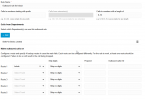
This is my outbound rule. I am not sure where you allow/deny the ability to dial out with a +, are you able to guide me on this please?

When I configured Twilio Auto I didnt do anything other than put the details in and select the one number I have hosted with Twilio.

I am not sure on Twilio where it is to check I am allowing calls to the UK, I will have a look at this.

Thanks,
Matt

1737968470868.png

Hello @matthew20687

Please make sure that when your dialing out from Twilio you are dialing the numbers in the +E164 number format to avoid any issues. Also check your outbound rules and makes sure that calls with + are permitted.

Also when you configured the Twilio via the Auto functionality did you make any changes to the trunk or the Twilio portal afterwards? Check that the credentials match at both sides and that you have not made any changes.

There is also the possibility that you need to allow calling to the UK from the Twilio portal.
 
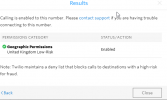
I have checked Twilio and its not blocking the country

1737969737875.png
Hello @matthew20687

Please make sure that when your dialing out from Twilio you are dialing the numbers in the +E164 number format to avoid any issues. Also check your outbound rules and makes sure that calls with + are permitted.

Also when you configured the Twilio via the Auto functionality did you make any changes to the trunk or the Twilio portal afterwards? Check that the credentials match at both sides and that you have not made any changes.

There is also the possibility that you need to allow calling to the UK from the Twilio portal.
 
Me again... but with good news. I deleted the SIP trunk on Twilio and on 3CX, redid it and outbound is working now :) No idea why but its working thats all I care about haha!

However, when I ring inbound the call goes straight to voicemail on 3CX which is a bit odd...

Hello @matthew20687

Please make sure that when your dialing out from Twilio you are dialing the numbers in the +E164 number format to avoid any issues. Also check your outbound rules and makes sure that calls with + are permitted.

Also when you configured the Twilio via the Auto functionality did you make any changes to the trunk or the Twilio portal afterwards? Check that the credentials match at both sides and that you have not made any changes.

There is also the possibility that you need to allow calling to the UK from the Twilio portal.
 
Me again... but with good news. I deleted the SIP trunk on Twilio and on 3CX, redid it and outbound is working now :) No idea why but its working thats all I care about haha!
This is because the trunk and the outbound rule were wrongly configured before. The outbound rule was limited to prefix "0" and the credentials on the trunk were changed. Were not the ones we auto provision.

Inbound calls are going to voicemail because the extension the calls are routing to is not registered. If you are using a Webclient then press the little bell icon on the top left to enable notifications. This will make your extension appear as registered.
Refresh your browser after doing so. You should them see your extension appear as green in the "Teams" menu.
 

Members Online Now

Forum statistics

Threads
111,832
Messages
589,283
Members
164,662
Latest member
DejanMDS