Solved SNOM BLF not working behind SBC

Status
Not open for further replies.

Joao Custodio

Forum User
Advanced Certified
Joined
Feb 1, 2018
Messages
20
Reaction score
1
Hi,

We recently moved 5 SNOM phones to a new office behind a SBC,

everything works fine except the BLFs,

The LEDs work fine but when we press the BLF to make a call the phone shows "Not found",

If we type the extension number manually it works normally and the BLF light goes red as expected,

The BLF work normally if the phone is connected directly to the 3CX server

Thank you
 
Hi Joao,

Did you factory reset the Snom phones before putting them behind the SBC?

If not, then I strongly recommend you do so.
 
Hi JohnS_3CX,

I've just factory reset the phone through the web page, when I assign it to the extension and provision the problem persists.

Regards
 
3CX Version: 16.0.9
3CX Server OS: Windows 10 Pro 21H1
SBC Server OS: Debian 4.19.194-3
Is the 3CX Server Hosted and where? On-premises
IP Phone Make/Model/Firmware version: SNOM D725 10.1.73.16
Provisioning Method: SBC
Trunk Provider: T4COM
Has the Firewall Checker passed: some Media Server full cone test failed, everything else passed
Are custom Phone Templates being used: No
 
Just to clarify a couple of points

- The 3CX server is hosted locally (ie. Location A)
- But the phones are at a different location, and there is an SBC installed at that location? (ie. Location B)
- What's the version of the SBC as it appears in the PBX trunks section?
 
3CX Server in location A has 10x SNOM D725 directly connected (Local LAN)
SBC server at location B has 3x SNOM D725
SBC version 18.0.27
 
Hi,

I have tested your scenario with:

- D725 FW 10.73.16
- SBC 18.0.27 running on a Pi 4 (Debian 10)
- Cloud-hosted 3CX machine V16.0.8.9

In my case, the BLFs appear to have provisioned normally. The lights flash to indicate idle/ringing/busy states, and if I press the BLF I can make a call normally without any issues.

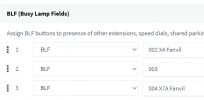
How are your BLFs configured? is it done from the management console like below, or do you configure anything manually?
1631533825485.png
 
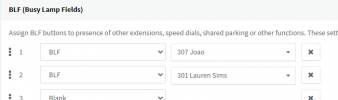
BLFs are configured as bellow,

1631534900459.png

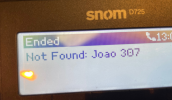
LEDs work as expected, just making the call fails with following message

1631535038078.png
 
I've logged in to the phone webpage and noticed the following:

Default BLF setting - <sip:307@3cx_sbc.********.com:5060;user=phone> - Fails

Changed to <sip:307@********.3cx.co.uk:5060;user=phone> - worked

not sure if this helps
 
It does not seem like your phone is correctly provisioned.. Mine is
<sip:[email protected]:5060;user=phone> (where 10.31.0.73 is the SBC IP)

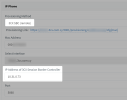
In your provisioning page do you have the correct IP address entered here for your SBC?

It has you be the LAN IP that the SBC machine has like my example:
1631536680700.png
 
  • Like
Reactions: Joao Custodio
Seems like that was the issue,

I had the 3CX SBC set to the SBC hostname, changed it to the IP address and now it works

Shouldn't the hostname work as well?

If I entered the ext. number manually the call worked only issue was with the BLF
 
You should not really be doing it this way. The way it was designed was to add the phone from the "Phones" page when they appear. This will automatically fill in the SBC IP information for you.

Since you were replacing it with a host name, the Snom phones were never tested in that scenario and as it turns out, that scenario does not work.

I suggest you change it in all your phones to make sure they are correctly provisioned across the board. Simply reset one phone at a time, and when they appear in the "Phones" page select them and click Assign Ext. and this will fill in the correct information.
 
I was doing it that way because the phones were already provisioned as Local Lan and then got moved to the new location.

Thanks for your help
 
Ah I see. Did you also have a local FQDN on your PBX?
 
No, local phones use the PBX IP address

I didn't realise using the SBC FQDN would cause issues
 
Glad we got it sorted! I would highly recommend you reset and reprovision the remaining 2 phones because they SBC name is also stored in other places, not just the BLFs. This is to make sure there are no nasty surprises in the future.
 
Will do,

Thank you
 
  • Like
Reactions: JohnS_3CX
Status
Not open for further replies.

Members Online Now

Forum statistics

Threads
111,832
Messages
589,280
Members
164,662
Latest member
DejanMDS