


- Joined
- May 17, 2010
- Messages
- 127
- Reaction score
- 50
I have a single site with 3CX hosted in Azure. The connectivity between the phones and 3CX is done via an existing Snom D862 configured as a router phone, and other phones that are not router phone capable (Snom D713) connect through this SBC. I would like to add a couple more router phone capable devices to the network to spread the SBC job around a bit and ensure that one phone being unplugged doesn't stop everything from working.
I added two new D862s and while the phone part seems to provision without issue, the SBC part doesn't. If I connect to the phone web UI I can log in with the admin credentials that 3CX generated and I can see the extension has been configured correctly, but the SIP proxy is set to :5060 which I assume implies it's trying to connect through itself but the SBC part of the device isn't working yet. The SBC shows in 3CX as red but I can't see any event logs showing it attempting to connect and failing, but I'm not 100% sure where to look either. If I change the SIP proxy to the existing router phone in my network the handset registers straight away but the SBC is still showing a red status in 3CX.
The log just contains these entries looped at the bottom:
Any pointers on which 3CX logs to look at or other tips would be appreciated, thanks.
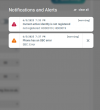
"Phone has an SBC error" pops up every ten seconds but disappears almost instantly. This screenshot is taken after a factory reset which is why the extension isn't registering, if I put the IP of the existing router phone into the SIP proxy field then that warning goes away.
I added two new D862s and while the phone part seems to provision without issue, the SBC part doesn't. If I connect to the phone web UI I can log in with the admin credentials that 3CX generated and I can see the extension has been configured correctly, but the SIP proxy is set to :5060 which I assume implies it's trying to connect through itself but the SBC part of the device isn't working yet. The SBC shows in 3CX as red but I can't see any event logs showing it attempting to connect and failing, but I'm not 100% sure where to look either. If I change the SIP proxy to the existing router phone in my network the handset registers straight away but the SBC is still showing a red status in 3CX.
The log just contains these entries looped at the bottom:
Code:
Jun  5 18:03:40.361 [NOTICE] PHN: Fetching URL: https://companyurl.3cx.co.uk:443/sbc/bT7pVBbiWTg5
Jun  5 18:03:40.379 [NOTICE] TLS: new session
Jun  5 18:03:52.403 [NOTICE] PHN: Fetching URL: https://companyurl.3cx.co.uk:443/sbc/bT7pVBbiWTg5
Jun  5 18:03:52.423 [NOTICE] TLS: new session
Jun  5 18:04:04.295 [NOTICE] PHN: Fetching URL: https://companyurl.3cx.co.uk:443/sbc/bT7pVBbiWTg5
Jun  5 18:04:04.335 [NOTICE] TLS: new session
Jun  5 18:04:15.795 [NOTICE] PHN: Fetching URL: https://companyurl.3cx.co.uk:443/sbc/bT7pVBbiWTg5
Jun  5 18:04:15.816 [NOTICE] TLS: new session
Jun  5 18:04:27.280 [NOTICE] PHN: Fetching URL: https://companyurl.3cx.co.uk:443/sbc/bT7pVBbiWTg5
Jun  5 18:04:27.293 [NOTICE] TLS: new session
Jun  5 18:04:33.696 [NOTICE] SIP: ProcessChallenge for active reg=0,0
Jun  5 18:04:33.697 [NOTICE] SIP: process auth: Match challenge for user=BojFGEED8b, realm=3CXPhoneSystem, method=REGISTER use_no_reg_auth=false
Any pointers on which 3CX logs to look at or other tips would be appreciated, thanks.
"Phone has an SBC error" pops up every ten seconds but disappears almost instantly. This screenshot is taken after a factory reset which is why the extension isn't registering, if I put the IP of the existing router phone into the SIP proxy field then that warning goes away.
Last edited:


