- Joined
- Oct 11, 2009
- Messages
- 24
- Reaction score
- 0
Hi all,
We have swapped our ISP's SpeedTouch modem with a proper DrayTek Vigor 2820n, but have been encountering problems with the good old QoS settings ever since. I have (just to be safe) followed the QoS steps described in http://www.3cx.com/blog/voip-howto/draytek-firewall-voip/, but people we call still complain about stuttering. Especially when sending out a large mail during the conversation... so a classic QoS problem.
The server running 3CX has a proper static public IP, and calling, getting called and terminating conversations work as expected... so no NAT issue there.
We have a dual-WAN setup but VoIP and RTP traffic is forced through WAN1 since WAN2 is behind a consumer modem which blocks proper VoIP communication completely:
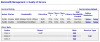
Basic overview of the QoS settings is as follows:
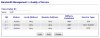
VoIP class settings look alright as well:
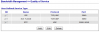
... as do the service types:
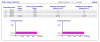
BUT: during a 1-minute call, the "status" view spikes when initiating the call and when putting the call on hold... so I'd guess that it's only tagging VoIP traffic and not the actual RTP traffic. During an active conversation or "on hold" music, VoIP traffic drops back to 0 Bps:
APP QoS is disabled because I didn't want to risk enabling other "fancy" features that might interfere with very basic QoS.
Any ideas?
We have swapped our ISP's SpeedTouch modem with a proper DrayTek Vigor 2820n, but have been encountering problems with the good old QoS settings ever since. I have (just to be safe) followed the QoS steps described in http://www.3cx.com/blog/voip-howto/draytek-firewall-voip/, but people we call still complain about stuttering. Especially when sending out a large mail during the conversation... so a classic QoS problem.
The server running 3CX has a proper static public IP, and calling, getting called and terminating conversations work as expected... so no NAT issue there.
We have a dual-WAN setup but VoIP and RTP traffic is forced through WAN1 since WAN2 is behind a consumer modem which blocks proper VoIP communication completely:
Basic overview of the QoS settings is as follows:
VoIP class settings look alright as well:
... as do the service types:
BUT: during a 1-minute call, the "status" view spikes when initiating the call and when putting the call on hold... so I'd guess that it's only tagging VoIP traffic and not the actual RTP traffic. During an active conversation or "on hold" music, VoIP traffic drops back to 0 Bps:
APP QoS is disabled because I didn't want to risk enabling other "fancy" features that might interfere with very basic QoS.
Any ideas?