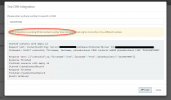
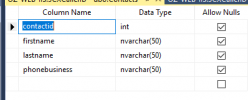
The table is fine. From the log I can see that the database is returning the data, but the template is not properly identifying the contact record.
Are you using the standard template we provide or you made changes? Can you paste here the XML you see when you go to the 3CX Console > Settings > CRM > MsSQL > Show template?
I selected the "Database MsSQL" Template.
Here is the copy and paste.
Thank you!
<?xml version="1.0"?>
<Crm xmlns:xsi="
http://www.w3.org/2001/XMLSchema-instance" xmlns:xsd="
http://www.w3.org/2001/XMLSchema" Country="US" Name="Database MsSQL" Version="4">
<Number Prefix="AsIs" MaxLength="[MaxLength]" />
<Connection MaxConcurrentRequests="2" />
<Parameters>
<Parameter Name="Server" Type="String" Parent="General Configuration" Editor="String" Title="Server:" />
<Parameter Name="Database" Type="String" Parent="General Configuration" Editor="String" Title="Database:" />
<Parameter Name="Username" Type="String" Parent="General Configuration" Editor="String" Title="Username:" />
<Parameter Name="Password" Type="String" Parent="General Configuration" Editor="String" Title="Password:" />
<Parameter Name="LookupSQLStatement" Type="String" Parent="General Configuration" Editor="Sql" Title="Lookup SQL Statement:" />
<Parameter Name="ContactUrlPrefix" Type="String" Parent="General Configuration" Editor="Sql" Title="Contact URL Prefix:" Default="
https://mycrmurl/contacts/" />
<Parameter Name="ContactUrlSuffix" Type="String" Parent="General Configuration" Editor="Sql" Title="Contact URL Suffix:" Default="/show" />
<Parameter Name="ReportCallEnabled" Type="Boolean" Editor="String" Title="Enable Call Journaling" Default="False" />
<Parameter Name="ReportCallSQLStatement" Type="String" Parent="ReportCallEnabled" Editor="Sql" Title="Call Journaling SQL Statement:" />
<Parameter Name="CreateContactEnabled" Type="Boolean" Editor="String" Title="Enable Contact Creation" Default="False" />
<Parameter Name="CreateOnCallDirection" Type="List" Parent="CreateContactEnabled" Editor="String" Title="Create Contacts on Call Direction:" Default="Inbound" ListValues="Inbound,Inbound/Outbound" />
<Parameter Name="CreateContactSQLStatement" Type="String" Parent="CreateContactEnabled" Editor="Sql" Title="Contact Creation SQL Statement:" />
</Parameters>
<Authentication Type="No" />
<Scenarios>
<Scenario Type="SQLDatabase">
<Query DatabaseType="MsSQL" ConnectionString="Server=[Server];Database=[Database];User Id=[Username];Password=[Password];" StatementPasses="2" Statement="[LookupSQLStatement]" />
            <Rules>
                <Rule Type="Any" Ethalon="">contactid</Rule>
                <Rule Type="Any">id</Rule>
            </Rules>
<Variables>
<Variable Name="ContactID">contactid<Filter /></Variable>
<Variable Name="FirstName">firstname<Filter /></Variable>
<Variable Name="LastName">lastname<Filter /></Variable>
<Variable Name="CompanyName">companyname<Filter /></Variable>
<Variable Name="Email">email<Filter /></Variable>
<Variable Name="PhoneMobile">phonemobile<Filter /></Variable>
<Variable Name="PhoneMobile2">phonemobile2<Filter /></Variable>
<Variable Name="PhoneHome">phonehome<Filter /></Variable>
<Variable Name="PhoneHome2">phonehome2<Filter /></Variable>
<Variable Name="PhoneBusiness">phonebusiness<Filter /></Variable>
<Variable Name="PhoneBusiness2">phonebusiness2<Filter /></Variable>
<Variable Name="PhoneOther">phoneother<Filter /></Variable>
<Variable Name="FaxBusiness">faxbusiness<Filter /></Variable>
<Variable Name="FaxHome">faxhome<Filter /></Variable>
<Variable Name="Pager">pager<Filter /></Variable>
<Variable Name="PhotoUrl">photourl<Filter /></Variable>
</Variables>
<Outputs AllowEmpty="false">
<Output Type="ContactUrl" Passes="0" Value="[ContactUrlPrefix][ContactID][ContactUrlSuffix]" />
<Output Type="FirstName" Passes="0" Value="[FirstName]" />
<Output Type="LastName" Passes="0" Value="[LastName]" />
<Output Type="CompanyName" Passes="0" Value="[CompanyName]" />
<Output Type="Email" Passes="0" Value="" />
<Output Type="PhoneMobile" Passes="0" Value="[PhoneMobile]" />
<Output Type="PhoneMobile2" Passes="0" Value="[PhoneMobile2]" />
<Output Type="PhoneHome" Passes="0" Value="[PhoneHome]" />
<Output Type="PhoneHome2" Passes="0" Value="[PhoneHome2]" />
<Output Type="PhoneBusiness" Passes="0" Value="[PhoneBusiness]" />
<Output Type="PhoneBusiness2" Passes="0" Value="[PhoneBusiness2]" />
<Output Type="PhoneOther" Passes="0" Value="[PhoneOther]" />
<Output Type="FaxBusiness" Passes="0" Value="[FaxBusiness]" />
<Output Type="FaxHome" Passes="0" Value="[FaxHome]" />
<Output Type="Pager" Passes="0" Value="[Pager]" />
<Output Type="PhotoUrl" Passes="0" Value="[PhotoUrl]" />
</Outputs>
</Scenario>
<Scenario Id="ReportCall" Type="SQLDatabase">
<Query SkipIf="[ReportCallEnabled]!=True" DatabaseType="MsSQL" ConnectionString="Server=[Server];Database=[Database];User Id=[Username];Password=[Password];" StatementPasses="2" Statement="[ReportCallSQLStatement]" />
<Variables />
<Outputs AllowEmpty="false" />
</Scenario>
<Scenario Id="CreateContactRecord" Type="SQLDatabase">
<Query SkipIf="[CreateContactEnabled]!=True||[IIf([CreateOnCallDirection]==Inbound,[CallDirection]!=Inbound,False)]==True" DatabaseType="MsSQL" ConnectionString="Server=[Server];Database=[Database];User Id=[Username];Password=[Password]" StatementPasses="2" Statement="[CreateContactSQLStatement]" />
            <Rules>
                <Rule Type="Any" Ethalon="">contactid</Rule>
                <Rule Type="Any">id</Rule>
            </Rules>
<Variables>
<Variable Name="ContactID">contactid<Filter /></Variable>
<Variable Name="FirstName">firstname<Filter /></Variable>
<Variable Name="LastName">lastname<Filter /></Variable>
<Variable Name="CompanyName">companyname<Filter /></Variable>
<Variable Name="Email">email<Filter /></Variable>
<Variable Name="PhoneMobile">phonemobile<Filter /></Variable>
<Variable Name="PhoneMobile2">phonemobile2<Filter /></Variable>
<Variable Name="PhoneHome">phonehome<Filter /></Variable>
<Variable Name="PhoneHome2">phonehome2<Filter /></Variable>
<Variable Name="PhoneBusiness">phonebusiness<Filter /></Variable>
<Variable Name="PhoneBusiness2">phonebusiness2<Filter /></Variable>
<Variable Name="PhoneOther">phoneother<Filter /></Variable>
<Variable Name="FaxBusiness">faxbusiness<Filter /></Variable>
<Variable Name="FaxHome">faxhome<Filter /></Variable>
<Variable Name="Pager">pager<Filter /></Variable>
<Variable Name="PhotoUrl">photourl<Filter /></Variable>
</Variables>
<Outputs AllowEmpty="false">
<Output Type="ContactUrl" Passes="0" Value="[ContactUrlPrefix][ContactID][ContactUrlSuffix]" />
<Output Type="FirstName" Passes="0" Value="[FirstName]" />
<Output Type="LastName" Passes="0" Value="[LastName]" />
<Output Type="CompanyName" Passes="0" Value="[CompanyName]" />
<Output Type="Email" Passes="0" Value="[Email]" />
<Output Type="PhoneMobile" Passes="0" Value="[PhoneMobile]" />
<Output Type="PhoneMobile2" Passes="0" Value="[PhoneMobile2]" />
<Output Type="PhoneHome" Passes="0" Value="[PhoneHome]" />
<Output Type="PhoneHome2" Passes="0" Value="[PhoneHome2]" />
<Output Type="PhoneBusiness" Passes="0" Value="[PhoneBusiness]" />
<Output Type="PhoneBusiness2" Passes="0" Value="[PhoneBusiness2]" />
<Output Type="PhoneOther" Passes="0" Value="[PhoneOther]" />
<Output Type="FaxBusiness" Passes="0" Value="[FaxBusiness]" />
<Output Type="FaxHome" Passes="0" Value="[FaxHome]" />
<Output Type="Pager" Passes="0" Value="[Pager]" />
<Output Type="PhotoUrl" Passes="0" Value="[PhotoUrl]" />
</Outputs>
</Scenario>
</Scenarios>
</Crm>