SSL Cert - Options?

Status
Not open for further replies.

PhoneEP

Premier Customer
Joined
Feb 15, 2023
Messages
68
Reaction score
15
When we upgraded from V16 to V18, we were told it was required to have an SSL for the FQDN. We did so and it renews in a month. Since it is up and running now, is that cert required still? I do not fully understand the need of the SSL. I know we can still access site when it expires as it happened a few years ago when we were on V16 for an extended time period. Is the SSL only required on fresh installs or when upgrading to new versions as we did from 16 to 18? (I am not very knowledgeable with Certs)

If still required to renew, is it as simple as copying new files from this link: https://www.3cx.com/community/threads/v16-ssl-certificate-renewal.66170/
"
On Step 2 you locate this folder
Windows: “C:\Program Files\3CX Phone System\Bin\nginx\conf\instance1”
Linux: “/var/lib/3cxpbx/Bin/nginx/conf/Instance1”

You copy the files manually there as described."

Thank You
 
The need for valid SSL has not changed in the last 5 years, if not more.

Yes, the PBX can be installed and ran without valid SSL but several functions will not work correctly or at all.

But yes, once you have the new cert, you copy the files to the correct location keeping the name the same and restart the 3CX PhoneSystem Nginx Server service. Then you can check by seeing what ssl is presented when visiting the webpage.
 
  • Like
Reactions: PhoneEP
Perfect! Thank You!
 
I have crt file and key file from renewal created and ready, but when I went to copy to C:, both of the current files are .pem extensions. Can I easily add that to file or do these need to be converted or did I do this wrong?
 
If you look at the existing files, you will see in the name that one is a key and one is a crt, despite both having .pem extension

You need to (back the old one up) name the new files the exact same names, cycle the service.
 
Will 3CX automatically convert them over to .pem? You can simply rename?

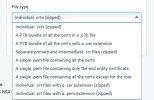
On attached, I do not know which one is the correct .pem to download to include. Also, I cannot find an option for a KEY file in .pem format. Thank You
 

Attachments

  • 2023-03-28_05-55-10.jpg
    2023-03-28_05-55-10.jpg
    39.3 KB · Views: 21
Last edited:
"A single pem containing all the certs"

The key file won't be at your register - it will be on whatever machine you made the CSR on, the same CSR you uploaded to the public CA (GoDaddy, etc). You have to export it from that machine in unencrypted key format, which can be named .pem without issue.

How did you generate the CSR?
 
CSR was generated using DigiCert Utility. I contacted them yesterday and we went over what was in the current cert expiring next month and their support said it was the "only the end entity" .pem. We ended up going to Cert Logik where you can paste to decode and since it only contained the single entry of code, I should be using the "end entity".

We were them able to rename, as you said, the .key file to .pem, and it worked.

I moved files to server and it sees new expiration date. Should I redo the cert? I am not familiar enough with certs to know the difference between all, single, without root. Their support actually said it depends on what the system requires and I cannot seem to find a clear answer on that. I paid for a Support Ticket as well and it was a dead end, they said I needed to contact CA.
 
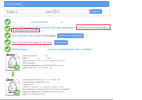
I have the first 4 green checks, but the last shows error atatched. Server is a green check, but a brocked red arrow then no Chain.

Assume if I picked the "containing all certs" option and redo I will get a green check on the chain then?
 

Attachments

  • 2023-03-29_08-46-49.jpg
    2023-03-29_08-46-49.jpg
    50.6 KB · Views: 3
Redid Cert and all green checks! Only difference is on mine is I have 2 different chains with a green check, the ROOT is included. Any advantage/disadvantage of having that? Thank You for your help!
 
Redid Cert and all green checks! Only difference is on mine is I have 2 different chains with a green check, the ROOT is included. Any advantage/disadvantage of having that? Thank You for your help!
Nope, you should be good to go. Having root and/or dual signing is fine, but not required.

The last test is to use the system and see if any issues happen.
 
  • Like
Reactions: PhoneEP
Good to go so far! Appreciate the info.
 
Status
Not open for further replies.

Forum statistics

Threads
111,974
Messages
590,081
Members
164,899
Latest member
mazet