SSL Certificate expired - cannot log in to PBX

Avram Grossman

Customer
Joined
Jan 5, 2019
Messages
41
Reaction score
2
Self-hosted V20 on a client's computer, I cannot log in using the FDQDN. The browsers (tried them all) block saying:
net::ERR_CERT_DATE_INVALID Look like the cert expired on 09/30/2024 and 3CX did not auto renew???

So, I can't get to the login screen.
 
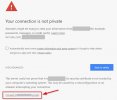
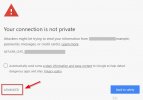
Typically, when the PBX fails to renew the certificate, it means something is preventing it from proceeding correctly.

This will require further investigation. In the meantime, you can access the PBX using this procedure, but it won’t resolve your issue.

IMG_7338.jpeg


IMG_7337.jpeg


I recommend searching the forum for topics related to expired certificates; you will likely find several troubleshooting steps.
 
Self-hosted V20 on a client's computer, I cannot log in using the FDQDN. The browsers (tried them all) block saying:
net::ERR_CERT_DATE_INVALID Look like the cert expired on 09/30/2024 and 3CX did not auto renew???

So, I can't get to the login screen.
It wasnt renewed because it is so outdated (2 years!) that it doesnt have the capability of communicating with anything on the 3CX infrastructure.

Please keep your machines up to date!
 
It wasnt renewed because it is so outdated (2 years!) that it doesnt have the capability of communicating with anything on the 3CX infrastructure.

Please keep your machines up to date!

Did I miss something
How did you spot that? Lol

Oh ! You must be a psychic! Nice ! :p
BUT, please don’t tell anyone the color of my underwear! :oops:
 
Did I miss something
How did you spot that? Lol

Oh ! You must be a psychic! Nice ! :p
BUT, please don’t tell anyone the color of my underwear! :oops:
Just a link to another post which mentioned update 4.
 
  • Like
Reactions: Guillaume Bourgeois

Forum statistics

Threads
111,955
Messages
589,925
Members
164,855
Latest member
parik24pro