SSL certificate expired (Let's Encrypt)

LipSti

SOHO User
Joined
Mar 27, 2025
Messages
6
Reaction score
0
My Let's Encrypt certificate expired 12 days ago. The firewall check does not show any errors. Is there a way to manually renew the certificate? Why doesn't it happen automatically?
 
This can happen if you have outgoing network restrictions on your network.

Does your event log show any failed SSL renewal attempts? Did you receive emails indicating the failure?

 
Unfortunately, this does not work. You can't see whether anything is happening at all.

The command in the article is not correct either.
Bash:
/usr/lib/3cxpbx/PbxConfigTool -renew-certificates


I ran the following, waited 10 minutes and then restarted the system.
Bash:
root@3cxdebian:~# su phonesystem
$ sr/lib/3cxpbx/PbxConfigTool -renew-certificates
sh: 1: sr/lib/3cxpbx/PbxConfigTool: Permission denied
$ /usr/lib/3cxpbx/PbxConfigTool -renew-certificates


        _____ _______  __
       |__  // ____/ |/ /
        /_ </ /    |   /
      ___/ / /___ /   |
     /____/\____//_/|_|

Welcome to the 3CX Configuration Tool
Help https://www.3cx.com/docs/manual/

$ exit
root@3cxdebian:~# reboot
 
Unfortunately, this does not work. You can't see whether anything is happening at all.

The command in the article is not correct either.
Bash:
/usr/lib/3cxpbx/PbxConfigTool -renew-certificates


I ran the following, waited 10 minutes and then restarted the system.
Bash:
root@3cxdebian:~# su phonesystem
$ sr/lib/3cxpbx/PbxConfigTool -renew-certificates
sh: 1: sr/lib/3cxpbx/PbxConfigTool: Permission denied
$ /usr/lib/3cxpbx/PbxConfigTool -renew-certificates


        _____ _______  __
       |__  // ____/ |/ /
        /_ </ /    |   /
      ___/ / /___ /   |
     /____/\____//_/|_|

Welcome to the 3CX Configuration Tool
Help https://www.3cx.com/docs/manual/

$ exit
root@3cxdebian:~# reboot
The command is correct, you didnt follow the instructions.
 
Anyway, did you set the parameter correct? Did you check your firewall?
 
The command is correct, you didnt follow the instructions.
Unfortunately, the command is not correct. At least that's the error I'm getting here:
Bash:
root@3cxdebian:~# su phonesystem
$ sr/lib/3cxpbx/PbxConfigTool -renew-certificates
sh: 1: sr/lib/3cxpbx/PbxConfigTool: Permission denied

What part of the instructions did I not follow? The only difference is that I restarted the entire host and not just the Nginx service.
 
Come on, thats just a typo...

Did you set the parameter correctly? Did you you check your firewall?
 
Come on, thats just a typo...

Did you set the parameter correctly? Did you you check your firewall?
The firewall check via the web interface shows no errors. Is there anything else I can check?

Which parameter do you mean? Sorry, I'm at a loss right now. I've written everything I've done so far in the post.
 
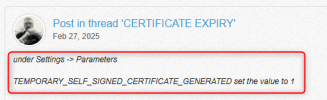
In the post there is everything you need. The first step is to alter the parameter. Without that it wont work.
 
I have done it exactly like this. unfortunately it still doesn't work. Have I done something wrong?
Bash:
root@3cxdebian:~# su phonesystem
$ /usr/lib/3cxpbx/PbxConfigTool -renew-certificates


        _____ _______  __
       |__  // ____/ |/ /
        /_ </ /    |   /
      ___/ / /___ /   |
     /____/\____//_/|_|

Welcome to the 3CX Configuration Tool
Help https://www.3cx.com/docs/manual/

$ exit
root@3cxdebian:~# service nginx restart
root@3cxdebian:~# service nginx status
● nginx.service - A high performance web server and a reverse proxy server
     Loaded: loaded (/lib/systemd/system/nginx.service; enabled; preset: enable>
     Active: active (running) since Fri 2025-03-28 11:32:22 CET; 4s ago
       Docs: man:nginx(8)
    Process: 76027 ExecStartPre=/usr/sbin/nginx -t -q -g daemon on; master_proc>
    Process: 76029 ExecStart=/usr/sbin/nginx -g daemon on; master_process on; (>
   Main PID: 76030 (nginx)
      Tasks: 3 (limit: 4652)
     Memory: 5.9M
        CPU: 51ms
     CGroup: /system.slice/nginx.service
             ├─76030 "nginx: master process /usr/sbin/nginx -g daemon on; maste>
             ├─76031 "nginx: worker process"
             └─76032 "nginx: worker process"

Mär 28 11:32:21 3cxdebian systemd[1]: Starting nginx.service - A high performan>
Mär 28 11:32:21 3cxdebian nginx[76027]: 2025/03/28 11:32:21 [warn] 76027#76027:>
Mär 28 11:32:22 3cxdebian nginx[76029]: 2025/03/28 11:32:22 [warn] 76029#76029:>
Mär 28 11:32:22 3cxdebian systemd[1]: Started nginx.service - A high performanc>
lines 1-19/19 (END)...skipping...
● nginx.service - A high performance web server and a reverse proxy server
     Loaded: loaded (/lib/systemd/system/nginx.service; enabled; preset: enable>
     Active: active (running) since Fri 2025-03-28 11:32:22 CET; 4s ago
       Docs: man:nginx(8)
    Process: 76027 ExecStartPre=/usr/sbin/nginx -t -q -g daemon on; master_proc>
    Process: 76029 ExecStart=/usr/sbin/nginx -g daemon on; master_process on; (>
   Main PID: 76030 (nginx)
      Tasks: 3 (limit: 4652)
     Memory: 5.9M
        CPU: 51ms
     CGroup: /system.slice/nginx.service
             ├─76030 "nginx: master process /usr/sbin/nginx -g daemon on; maste>
             ├─76031 "nginx: worker process"
             └─76032 "nginx: worker process"

Mär 28 11:32:21 3cxdebian systemd[1]: Starting nginx.service - A high performan>
Mär 28 11:32:21 3cxdebian nginx[76027]: 2025/03/28 11:32:21 [warn] 76027#76027:>
Mär 28 11:32:22 3cxdebian nginx[76029]: 2025/03/28 11:32:22 [warn] 76029#76029:>
Mär 28 11:32:22 3cxdebian systemd[1]: Started nginx.service - A high performanc>
 
Did you set the parameter?
 
You need to go into the PBX and set the TEMPORARY_SELF_SIGNED_CERTIFICATE_GENERATED parameter to 1 to be able to run the command.

1743164183786.png

1743164244182.png
 
You can check it after but it should revert back to 0 after the whole process is completed
 

Members Online Now

Forum statistics

Threads
111,835
Messages
589,289
Members
164,668
Latest member
Infinity Network