Solved SSL Certificate renewal failed

Status
Not open for further replies.

bchesnut

Customer
Joined
Jul 19, 2016
Messages
6
Reaction score
1
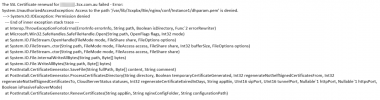
I have just upgraded my pbxexpress in SNAG-0912.pngAzure to the latest 3cx, before the upgrade I noticed the SSL certificate was expired, I am trying to renew the certificate now but getting this error:
 
How did you try to renew it manually?
Did you do a manual renew in the past?

It appears that the user owning the file has changed and can no longer be updated/accessed by 3CX.
 
never had to do it manually in the past, but it won't renew
 
SSH into the system and navigate to: /var/lib/3cxpbx/Bin/nginx/conf/Instance1

make sure that all files in the said directory have the following permissions:
-rw-r--r-- phonesystem phonesystem

Once done, try again and let us know if the issue persists.
 
this is what they were already set to1618815922319.png
 
Before running the command to renew the certificate (/usr/lib/3cxpbx/PbxConfigTool -renew-certificates)
switch to the phonesystem user with:
sudo su phonesystem
 
Thanks, that worked
 
If you are being prompted for a password after running a command with sudo, it should specify the user to which the password belongs to, which is most probably the user you are currently logged in with. That said, the SSH user created should have the same password as the one set for the 3CX Management Console.
 
Glad to hear you resolved this @bchesnut. If you require any further assistance, feel free to open a new thread.
 
Status
Not open for further replies.

Forum statistics

Threads
111,974
Messages
590,081
Members
164,899
Latest member
mazet