Stuck with usa format on time and date

Status
Not open for further replies.

garnesdata

Silver Partner
Advanced Certified
Joined
May 25, 2020
Messages
39
Reaction score
6
Hi

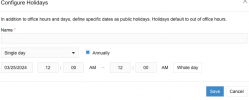
I've been letting my users change holiday settings for their department in v20 and can't seem to find a way to get a " normal" time and date format. I've changed the language and time zone in options and also within the departments. Can you help out with this?
 
Hi there.
Are you referring to the reports or what exactly?
 
Hi there.
Are you referring to the reports or what exactly?
Sorry about being unclear, I mean adding holidays for departments. 1711372170576.png
 
Hi there.
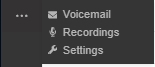
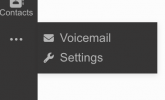
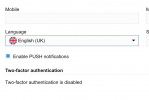
You will need to change the language in the Settings:

1711372314180.png


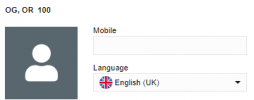
and set to UK

1711372318686.png
 
I see now :) in the softphone, not admin.
 
In V20 the Admin has moved your WebClient portal, as long as you have the correct Role.
But anyway, i am glad that you found what you needed :)
 
Yes I know that of course. I just meant this is changed on user level now not in admin for the whole system so that’s new.
 
I see what you mean, yes, you are right and this is a user setting.
Have a nice day
 
  • Like
Reactions: garnesdata
Hi,
I hope it's alright to piggyback on this thread, I'm seeing the same issue in V20, however on the admin page/dashboard/settings. I'm currently set to English (UK):

Screenshot 2024-04-12 104913.png
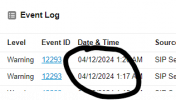
This is my dashboard event logs:
Screenshot 2024-04-12 105420.png
Screenshot 2024-04-12 110321.png

Is there another spot I need to change to get this to the correct date format?
 
Can you try and clean the cache of the browser and login from the incognito window?
 
Thank for the quick reply, unfortunately it looks the same. I tried clearing out the cookies and cache, then tried a new incognito window but the US formatting persists. Anything else I can try?
 
i am trying to reproduce it from my end even changing browser settings, and i am not able to
 
Computer locale is set to Aus, I'm not sure where else I can check. I had a quick look through the browser and it's not showing any location settings beyond allowing sites to see location.
I'm not sure if it helps at all but it only started after upgrading to V20, previous to that it was all correct.
 
Do you have any other machine of V20, or perhaps you can do one in Startup do you see the same even if in UK language?
Give a try Edge browser if using Chrome, any difference?
 
Hi,
I hope it's alright to piggyback on this thread, I'm seeing the same issue in V20, however on the admin page/dashboard/settings. I'm currently set to English (UK):

View attachment 40839
This is my dashboard event logs:
View attachment 40840
View attachment 40841

Is there another spot I need to change to get this to the correct date format?
It only worked when I changed the language in the webclient like Oleg suggested: 1712909693867.png
under settings - general 1712909789669.png

Björn
 
  • Like
Reactions: OlegR_3CX
Hi Björn, thank you for the feedback too.
Lets see more feedback from out colleague above, as he is in a different timezone and will get back later.
 
Thank you both for the help, I tried using different browsers including Chrome, Edge and FF. All displayed the same result. I then tried Björn's suggestion and change the language under my own settings and this has worked, under the admin dashboard everything is now dd/mm/yyyy.
I guess my next question is what does the setting under the admin-->system do if it does not have any effect on the admin dashboard locale settings?
Thank you both again for the help.
 
Status
Not open for further replies.

Latest Posts

Forum statistics

Threads
111,953
Messages
589,915
Members
164,850
Latest member
masvty