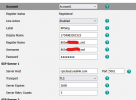
T42S not registering "Failed"

Alphabetic

3CX MVP
Silver Partner
Advanced Certified
Joined
Jul 1, 2016
Messages
6,533
Reaction score
2,558
Hi chaps, it's been a minute since I had to register some older phones.

im running 20 U7 B943

i've attempted to provision a 42S over an SBC.

The phones have provisioned but im getting "register failed"

FW 66.86.0.15

this is happening on all the 42S phones.
 
  • Like
Reactions: Colorado VoIP
Also get this when I factory reset

1754983492571.png

phone is asking for RPS server PIN.. its asking for 8 digits

it doesnt like the VM PIN

I suspect this is maybe attached to another RPS server that isnt 3CX?
 
Changing transport from TLS to UDP allows the extension to register.
 
I would suggest to insert the 3CX provlink under autoprovision if you can Not remove it from the other rps
 
I would suggest to insert the 3CX provlink under autoprovision if you can Not remove it from the other rps
I was able to get Yealink to remove the MAC from the other RPS which allowed me to get it sorted. But, I still had to change transport method
 
i had this similar problem moving 42S phones over to a new system and thought it was a fluke, posted about it in the partner section of the forum. so i'm glad to see i am not crazy and it maybe is a firmware thing. ultimately i just put the auto prov link into the phone directly and it linked up at next reboot.
 
i had this similar problem moving 42S phones over to a new system and thought it was a fluke, posted about it in the partner section of the forum. so i'm glad to see i am not crazy and it maybe is a firmware thing. ultimately i just put the auto prov link into the phone directly and it linked up at next reboot.
I still had the issue with the extension not registering. Im having to manually change to UDP.
 
I still had the issue with the extension not registering. Im having to manually change to UDP.
interesting. i did not experience that!
 
what FW? I was on the currently supported
same, currently supported 3cx firmware installed from a 3cx system. i was merging a customer with 2 independent locations and two 4 call systems to one shared 8 call systems. when i did their first site the router phones came online fast, but the 42S gave me the exact same fit you are having.
 
Hi,

When you reset, the screenshot you shared shows something coming from Yealink directly. The Yealink article you shared also confirms that. We never ask for RPS server PIN, that's your additional confirmation that this is not 3CX related.

Having to switch to TCP is not something that 3CX ever requires. We only support that phone in SBC and LAN mode, both of which use UDP. That is a red flag showing that the phone still retains settings from when it was last bound to the 3rd party RPS account you liberated it from, or that something is wrong on your network setup which prevents UDP from reaching its destination.

I recommend to delete the phone from 3CX and then factory reset it. It should appear in the PnP menu, and you can assign it to 3CX from there.
 

Members Online Now

No members online now.

Forum statistics

Threads
111,831
Messages
589,277
Members
164,660
Latest member
RJenkinsROCK