T43U router Phone does not work even with right update

Samuele - Eurocom

Bronze Partner
Joined
Jun 13, 2023
Messages
38
Reaction score
3
You need to ensure that the ip phones are always using the latest 3CX Supported and Tested firmware version to avoid any issues but also get the phone ready to be used as a router phone.

@JohnS_3CX

I am resuming this discussion, as I am experiencing problems with the T43U router phones.

Screenshot 2024-10-30 123914.png

Screenshot 2024-10-30 120117.png

Screenshot 2024-10-30 120137.png

Screenshot 2024-10-30 120223.png

Screenshot 2024-10-30 120404.png


in a nutshell, from what you can see I have two phones to become routers, the first one the T46U applying the firmware that you download from the 3cx site, it works regularly ( although now that it is registered on the PBX it wants me to revert the phone to an older version)
I am experiencing the problem on the T43U phone, which with any version does not register and does not take the information even if I load the URL string by hand.
I have also tried registering it in another PBX that already has T43Us running as routers registered with V18 is now are running with V20, it is also not working there anymore.
 
A few things might be wrong here and at first look it seems something to do with your networking or DNS or the machine not being updated/updatable.

1. We released 108.86.0.93 a while ago, your PBX should not be offering .77 unless it has a problem and cannot receive updates. Check the updates page please.

2. I have successfully provisioned both T43U and T46U on the latest v20.0 Update 3 (Build 806) as router phones. Make sure your PBX is also updated from the updates page (System > Updates)

Perhaps if your PBX cannot see the new firmware, it might also mean that it cannot be seen by the phones so they can get their provisioning files.


PS: Please do not hijack other threads, your issue is not the same as the original issue (user had non 3CX firmware installed with no router function built in). It's better to start a new thread in the Yealink section https://www.3cx.com/community/forums/yealink/
the PBX is a free version, so it is automatically updated by you.
 
Hi Samuele,

If it is a 1234.3cx.cloud address please send me the address to check
 
1. For T46U: We can confirm the server has .93 from here, you are probabably seeing outdated information about .77. Press CTRL+SHIFT+R on the phone tab to reload the page without caching.

2. For T43U: We can see that the phone downloaded the config successfully a few times yesterday and today. Did you perhaps connect the phone via WiFi instead of LAN? Also do you perhaps have an IPv6 based internet connection?
 
1. For T46U: We can confirm the server has .93 from here, you are probabably seeing outdated information about .77. Press CTRL+SHIFT+R on the phone tab to reload the page without caching.

2. For T43U: We can see that the phone downloaded the config successfully a few times yesterday and today. Did you perhaps connect the phone via WiFi instead of LAN? Also do you perhaps have an IPv6 based internet connection?
1) I confirm that it no longer asks to be updated to .77
2) the phone is connected via LAN, is I confirm to you that I do not have an IPv6 connection, in fact the t43u is connected in the same network as the t46u which works.
I even tried 4 different connections.
In addition I will add to you that the t43u is not working even if I try to register it in a pbx with pro license, where inside it has 2 t43u already running as router phone for more than a year is they are working properly.
 
1) I confirm that it no longer asks to be updated to .77
2) the phone is connected via LAN, is I confirm to you that I do not have an IPv6 connection, in fact the t43u is connected in the same network as the t46u which works.
I even tried 4 different connections.
In addition I will add to you that the t43u is not working even if I try to register it in a pbx with pro license, where inside it has 2 t43u already running as router phone for more than a year is they are working properly.
Does it register if you configure it behind an existing Router Phone/SBC? Which means you will have to temporarily configure it as a normal phone.
 
Does it register if you configure it behind an existing Router Phone/SBC? Which means you will have to temporarily configure it as a normal phone.
I just tried it is also behind t46u, it doesn't register.
I deleted the phone from the user is put back as phone behind router phone, rebooted and put the link by hand inside the phone but nothing.
 
I just tried it is also behind t46u, it doesn't register.
I deleted the phone from the user is put back as phone behind router phone, rebooted and put the link by hand inside the phone but nothing.
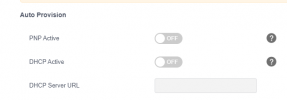
when you put the link by hand, try disabling PNP Active and DHCP Active and try to provision:
1730302596557.png
 
when you put the link by hand, try disabling PNP Active and DHCP Active and try to provision:
View attachment 44847
disabling the options does not work
.
.
.
.
.
I just tried connecting a t33g behind the t46u and it works properly.
I tried registering the t43u that wasn't going on another PBX under SBC linux and everything works....
i don't know how to try anymore
 
disabling the options does not work
.
.
.
.
.
I just tried connecting a t33g behind the t46u and it works properly.
I tried registering the t43u that wasn't going on another PBX under SBC linux and everything works....
i don't know how to try anymore
This may be a long shot.
- Remove the MAC from 3CX
- Downgrade to the Yealink firmware 108.86.0.70
- Factory reset the phone
- Then setup the phone again behind the T46U as normal phone
- If it registers, let 3CX upgrade the firmware to latest
- Then try to setup as router phone again
 
This may be a long shot.
- Remove the MAC from 3CX
- Downgrade to the Yealink firmware 108.86.0.70
- Factory reset the phone
- Then setup the phone again behind the T46U as normal phone
- If it registers, let 3CX upgrade the firmware to latest
- Then try to setup as router phone again
I performed all of your procedures, so that's how it worked.
It's not good, though...
Where to make some corrections? @JohnS_3CX

 
I performed all of your procedures, so that's how it worked.
It's not good, though...
Where to make some corrections? @JohnS_3CX


This is not definitive, we still don't know why it worked this time, and it could just be a matter of luck. However, I can confirm that phones upgraded from the previous .77 to the next .93 did not show any issues here and it's doubtful your firmware upgrade was the problem. I think the factory reset may have helped more than anything else which you absolutely should do whenever in doubt (you never mentioned factory reset in your previous posts).

Recommendation: if you face this problem again (correct firmware installed but will not register) you will can contact Yealink directly so they can analyze the phone logs - this might reveal the root cause of the problem.
 
I confirm that although I never mentioned it, the phone all yesterday was reset several times.
Anyway for the moment we can close it here, although I couldn't do the installation from the client since it didn't start only the T43U phone...
Thank you all
 

Members Online Now

No members online now.

Forum statistics

Threads
111,831
Messages
589,277
Members
164,660
Latest member
RJenkinsROCK