


- Joined
- Feb 10, 2025
- Messages
- 13
- Reaction score
- 5
Problem description:
the IP phone receives a call and rings. The handset is picked up. The phone keeps ringing. This doesn't happen to every phone call.
Yealink T43U
Running firmware: 108.87.0.16
Mode: router phone
Powered by a phone power adapter.
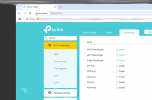
The phone is located behind TP Link Archer VR300 router. The router has ALG disabled as per the picture below:
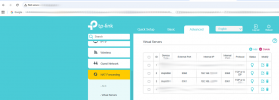
The IP phone has got a DHCP-reserved IP address within 192.168.x.y/24 network. The router has also got port forwarding for ports 5060 and 5061 set up that end up hitting the phone's 192.168.x.y IP address:
the IP phone receives a call and rings. The handset is picked up. The phone keeps ringing. This doesn't happen to every phone call.
Yealink T43U
Running firmware: 108.87.0.16
Mode: router phone
Powered by a phone power adapter.
The phone is located behind TP Link Archer VR300 router. The router has ALG disabled as per the picture below:
The IP phone has got a DHCP-reserved IP address within 192.168.x.y/24 network. The router has also got port forwarding for ports 5060 and 5061 set up that end up hitting the phone's 192.168.x.y IP address:


