Solved Teams certificate showing as expired

Status
Not open for further replies.

dattics

Silver Partner
Basic Certified
Joined
Sep 27, 2016
Messages
4
Reaction score
0
Hi, we already have Teams Integration up and everything has been working nice.

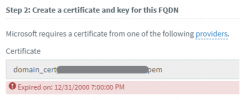
However, after some weeks, every time we want to change some configuration (https://example.3cx.co/#/app/settings/office365), the certificate shows as expired, even though, the expiration date is on 2022.

We are on version 18.0 Update 2 (Build 307) installed on an Azure VM (via marketplace).

This has also happen to other of our customers using the integration.

Before clicking OK to save:
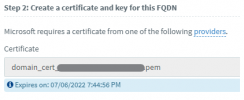
Before.png

After saving:
After.png
 
Can you try rebooting one of the Azure instances and see if the issue remains?
 
  • Like
Reactions: Evolute IT
I am having this same issue.
1639669305963.png
 
Last edited:
I am having this same issue.
View attachment 26648
The cert name is a bit weird in your case, because after you upload it and press OK, when you go back to this page it should have changed names to the format "domain_cert_xxxxxxxxxxxx.pem".

Are you also on Azure?
 
Nick, I am working with an on-premise Windows system. and a wildcard certificate.
The cert name is a bit weird in your case, because after you upload it and press OK, when you go back to this page it should have changed names to the format "domain_cert_xxxxxxxxxxxx.pem".

Are you also on Azure?
 
wild-cards are in this place not supported!
 
  • Like
Reactions: NickD_3CX
I bought a normal (no-wildcard) certificate to my domain:

teams.xyz.domain.com --> Error persists

Could this be another error? Does it accept two subdomains?
 
I bought a normal (no-wildcard) certificate to my domain:

teams.xyz.domain.com --> Error persists

Could this be another error? Does it accept two subdomains?
Go here: https://www.sslshopper.com/ssl-checker.html
Input your Teams FQDN with the Teams Port (5062) and check. If there is any error, you need to fix it first.

Example:
teams.xyz.domain.com:5062
 
I bought a new SSL certificate (not wildcard) with GoDaddy, upload it and shows as "Expired on: 12/31/2000 7:00:00 PM".
 
I bought a new SSL certificate (not wildcard) with GoDaddy, upload it and shows as "Expired on: 12/31/2000 7:00:00 PM".
Sounds like you used the wrong files as certificate and key.

Once again, make sure you read the whole docs once or twice before trying it. The order of the content of the files is also very important.
 
  • Like
Reactions: Evolute IT
Anyone find a fix for this? I have the same problem on one of our servers. It just started doing this recently. Initial config, sync, and install all went well. Users are able to call out/in through Teams, but now when I go to add a user in the 3CX O365 User Sync tab, I am unable to same and it sends me over to the Teams Direct Routing tab and says my cert expired 22 years ago. An SSL check of the cert doesn't show any errors:

1641927045003.png
 
... I am unable to same and it sends me over to the Teams Direct Routing tab and says my cert expired 22 years ago.
Sorry, meant to say I am unable to "save"...
 
Sorry, meant to say I am unable to "save"...
The Teams certificates you uploaded are in /var/lib/3cxpbx/Instance1/Bin/Cert/ .
Can you try running the command openssl x509 -enddate -noout -in <teams Cert PEM file> and tell me what the output is?
 
Hi Nick,

We are experiencing the same issue, but was working successfully last year at setup. I'm including the first few lines of the OpenSSL Output which displays the validity and issuer

Issuer: C = US, O = DigiCert Inc, OU = www.digicert.com, CN = RapidSSL RSA CA 2018
Validity
Not Before: Jun 30 00:00:00 2020 GMT
Not After : Jul 1 12:00:00 2022 GMT
 
Hi Nick,

We are experiencing the same issue, but was working successfully last year at setup. I'm including the first few lines of the OpenSSL Output which displays the validity and issuer

Issuer: C = US, O = DigiCert Inc, OU = www.digicert.com, CN = RapidSSL RSA CA 2018
Validity
Not Before: Jun 30 00:00:00 2020 GMT
Not After : Jul 1 12:00:00 2022 GMT
I sent you a PM.
 
Status
Not open for further replies.

Forum statistics

Threads
112,148
Messages
590,963
Members
165,170
Latest member
SupportRock