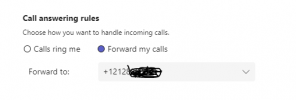
Teams client Forward my calls

jth

Platinum Partner
Advanced Certified
Joined
Apr 30, 2021
Messages
6
Reaction score
0
Has anyone got Forward my calls/ Also ring to work in teams with direct routing?
 
Hosted in AWS. 1650912157303.png
 
I have it full working - both incoming and outgoing - was pretty straightforward - just worked :)

I had to disable E164 processing for outgoing calls to work.

Call quality is really good.

Teams client works nicely.

Using self hosted and my own domain. Used this cert https://www.ssls.com/ssl-certificates/comodo-positivessl which is really cheap and Microsoft seem to accept it

18.0 Update 3 (Build 461)

(I tried it prior on 3cx hosted but struggled a little)
 
You got call forwarding to an external number thru teams working?
1651259430875.png
 
Sorry, didn't try that but it doesn't work

Get the following logs

05/01/2022 9:28:26 PM - [CM503003]: Call(C:12): Call to <sip:+44xxxxxxx;ext=[email protected]:0> has failed; Cause: 603 Decline/INVITE from x.x.x.x:5061
05/01/2022 9:28:26 PM - Call to T:Extn:100@[Dev:sip:+44xxxxxxx;ext=[email protected]] from L:12.1[Line:10000<<07xxxxxxxx] failed, cause: Cause: BYE from PBX

let me know when there is a fix :)
 
I get the same logs. I was hoping someone on here would know if this feature works?
 
Unfortunately I don't think this will work because when forwarding, Teams will send the call on, but the "Caller" is not the extension, instead it presents the initial Caller.
3CX though rejects that because it does not trust the "initial caller", only the synced Teams Extension are allowed to make calls.

There *may* be a way to allow this in the future, but right now this is not possible.

The recommendation though right now is instead of setting the forwarding on the Teams client, is to set the Forwarding on the 3CX Extension level, then use the Dial Codes *30, *31, *32, *33, *34 to change between the 3CX User Statuses so that the Forwarding happens by 3CX before the call even reaches Teams.
 
  • Like
Reactions: dniasoff
Thanks for this detailed response :)
 
  • Like
Reactions: NickD_3CX
Thanks for the clarity Nick. The customer only wants to use the Teams client. They have 700 users and most know how to use teams and they don't want to train on 3cx. I will have to go with a SBC to teams with a SIP trunk instead.
Thanks again.
 
Nick
I have engaged Microsoft Teams for this issue.
I sent them log files from 3CX and they responded with this:

Greetings for the day,

We checked the call and found the below details:

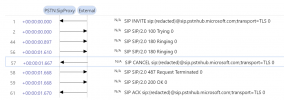
1651758408287.png

So you can see that after 180 ringing the reply from SBC is cancel with TLS 0 and in place of that it should be 200 Ok or 183 ringing or session in progress, So first I request you to check that the TLS is updated in SBC,

After that I request you to please help me with the below information again:
• TLS confirmation


I have enable TLS for sip transport under User, Phone Provisioning Tab. Do I need to enable TLS on SIP Trunk Transport Protocol under SIP trunk, Options?
 
Nick
I have engaged Microsoft Teams for this issue.
I sent them log files from 3CX and they responded with this:

Greetings for the day,

We checked the call and found the below details:

View attachment 29999

So you can see that after 180 ringing the reply from SBC is cancel with TLS 0 and in place of that it should be 200 Ok or 183 ringing or session in progress, So first I request you to check that the TLS is updated in SBC,

After that I request you to please help me with the below information again:
• TLS confirmation


I have enable TLS for sip transport under User, Phone Provisioning Tab. Do I need to enable TLS on SIP Trunk Transport Protocol under SIP trunk, Options?
Hi!

Is is some other problem you arefacing or are you trying to achieve what I mentioned doesn't work in my previous response about the Forwarding number?
If you have 700 users and you want them all to use Teams, I don't think this is the solution you want.

The concept behind the Teams integration was to have mostly 3CX Clients connected, and the users of the organization that do want/need to have the Teams client because they need it for other things, they could have it for making and receiving calls, but mostly those features. For more they would need to use the 3CX Forwarding Rules.
Also the Teams integration is not designed or meant for placing users in Queues and generally "phone power users" are recommended to use the 3CX Clients.

To summarize, our intention was not to "adopt" the Teams client as our own, there are and there will most likely always be some limitations to the integration.
 
Hi @NickD_3CX

I hope you don't mind if I add my two pennies worth.

I have worked with Teams which was originally Lync, which then evolved into Skype for Business and finally turned into the Teams app we know today.

Microsoft have struggled and put a lot of effort into combining presence, voice, email, chat, calendar, collaboration and meetings into a single robust easy to use application (and even purchased skype for $8.5 billion to help them achieve this goal).

Whilst the earlier iterations Teams (Lync & Skype for Business) were horrible and unreliable applications (especially when it came to voice), Teams actually isn't have bad and it's UX is incredibly good.

However Teams is not a fully fledged or easy to use phone system and is unlikely to ever turn to one. It won't play well with paging system, door phones, intercoms etc and the myriad of other functions that you would expect from a typical phone system. Also from a voice engineers experience, a centralised and easy to use interface such as the 3CX admin portal is much easier to use and troubleshoot from a voice perspective than trying to control call flows through Teams management portal.

Expecting end users to rely on Teams for collaboration and install 3cx for voice creates unnecessary complexity. Competing with Teams isn't a strategy that is likely succeed especially since it is so tightly linked into Office 365 and Azure Active Directory.

I think there is a wonderful opportunity to complement Teams with voice "done well" and create a product that integrates tightly into both Azure AD and the whole SIP eco system. This would open up 3CX to a whole new market and easily become the de facto voice solution that Teams users adopt when they want a little more than just basic VOIP.

However the integration would need quite a bit more than what is currently offered. I haven't researched what could be achieved bit it would ideally support "Power Users". For example call routing to Azure AD groups would be a nice feature or controlling call flow based on Teams status would be nice. And would of course require control of voice features to be managed from the Teams desktop or mobile client and not require the end user to manage their voice from 2 different applications and UIs.

Teams has an open API and is designed for integration into other applications. For example a quick google search shows this https://docs.microsoft.com/en-us/microsoftteams/teams-contact-center.

Just my two pennies worth :).

Thanks for reading.

Daniel
 
  • Like
Reactions: NickD_3CX

Members Online Now

Forum statistics

Threads
111,832
Messages
589,278
Members
164,662
Latest member
DejanMDS