Teams Dialer not showing

DavidHod

Customer
Joined
Jan 3, 2022
Messages
7
Reaction score
2
Morning Guys

Hope you all doing well today. I have successfully completed the 3CX and teams integration as per guide and info provided.
All systems show that the integration was a success and Ext are showing registered. The extensions show 365+teams.
Also checked the activity log and I don't see any errors there. We still cannot see the teams dialer and its been 2 days since the integration was completed.
We have restarted teams and restarted PC's multiple times.

I've checked all the info provided and there is nothing further that is needed to complete the integration as per the guides.

Is there something I may have missed or over looking?

Look forward to your responses.

Thanks,
 
Do you have the necessary licenses?
 
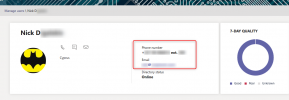
In the Teams Admin page, under the user, do you see the Phone number in this format?
1641559791934.png

Note it should show both the Office Phone and Extension number you have assigned this extension in 3CX.

You might also want to go through this FAQ doc we have put together that points out a lot of common mistakes:
https://www.3cx.com/docs/microsoft-teams-integration-faqs/#h.4dm9u5zhjuda
 
Do you have the necessary licenses?
I have 3CX enterprise and business voice licenses setup and active. Is there any others I require?
 
In the Teams Admin page, under the user, do you see the Phone number in this format?
View attachment 26935

Note it should show both the Office Phone and Extension number you have assigned this extension in 3CX.

You might also want to go through this FAQ doc we have put together that points out a lot of common mistakes:
https://www.3cx.com/docs/microsoft-teams-integration-faqs/#h.4dm9u5zhjuda
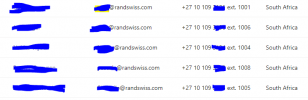
Thank you for the message, Please see below, I have the following info in Teams
As you can see its correctly setup. However the users are missing their dialers

1641803461102.png
 
Thank you for the message, Please see below, I have the following info in Teams
As you can see its correctly setup. However the users are missing their dialers

View attachment 26983
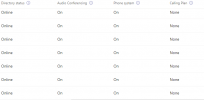
Do they have the Phone system license flag?
1641816867922.png


[EDIT]
One more thing you could try, instead of logging in with the Teams Desktop App, try the Teams Webclient
 
  • Like
Reactions: Evolute IT
Do they have the Phone system license flag?
View attachment 26993


[EDIT]
One more thing you could try, instead of logging in with the Teams Desktop App, try the Teams Webclient
Hi Nick,

Thank you for your time and assistance. Its greatly appreciated.

Please see below, I have made sure that the correct licensing has been purchased.

I have asked the client to login to teams on their browser to see if the dialer is there.
Will let you know.

Thanks,
1641894571457.png
 
  • Like
Reactions: NickD_3CX
How does MFA tie into the integration. Is there a chance that MFA gets disabled if the scripts are run using a global admin? We noticed a disable of the MFA for all users and we have since enabled it. However the telephone number and ext number are now gone from the users info within teams admin center since we reenabled MFA

Your thoughts?

Should I run the scripts again?
 
How does MFA tie into the integration. Is there a chance that MFA gets disabled if the scripts are run using a global admin? We noticed a disable of the MFA for all users and we have since enabled it. However the telephone number and ext number are now gone from the users info within teams admin center since we reenabled MFA

Your thoughts?

Should I run the scripts again?
The user script that is generated runs 2 commands:
Set-CsUser
New-CsBatchPolicyAssignmentOperation

I looked through the documentation MS has on these commands and I can't see any mention of MFA being affected or set or overriden with these commands, so unless MS is doing something funky (and undocumented from the looks of it...) with these commands, I am obliged to say that no, it shouldn't be affected.

You could try running the user script again, or for something more "targeted", you could try the suggestion of another user here, that gives a way to set only the Teams Number
 
The user script that is generated runs 2 commands:
Set-CsUser
New-CsBatchPolicyAssignmentOperation

I looked through the documentation MS has on these commands and I can't see any mention of MFA being affected or set or overriden with these commands, so unless MS is doing something funky (and undocumented from the looks of it...) with these commands, I am obliged to say that no, it shouldn't be affected.

You could try running the user script again, or for something more "targeted", you could try the suggestion of another user here, that gives a way to set only the Teams Number
Hi Nick,

This was very helpful thank you, I managed to get the teams Dialer now on the clients for the users. Did not have to wait long. It seems Azure servers are pushing those client re-provisions quickly.

I do however have another issue which stems to the SSL cert setup - Event report :
01/17/2022 1:35:06 PM - Exception creating Teams transport: Failed opening PEM chain file
All my certs where accepted by system but the above error is the in the events of the 3CX
So going to get onto Cloudflare community to help with the PEM chain file, they don't seem to provide intermediate certs. Which is a requirement in the chain pem file.

One question, do i have to run the dial plan scripts again once the correct pem chain file has been provided?

Thanks,
 
One question, do i have to run the dial plan scripts again once the correct pem chain file has been provided?
No, this shouldn't be necessary, once you fix it and upload the new/modified one you should be good to go.
 
  • Like
Reactions: Evolute IT
No, this shouldn't be necessary, once you fix it and upload the new/modified one you should be good to go.
Thank you Nick, I really appreciate your help thus far
 
  • Like
Reactions: NickD_3CX

Members Online Now

Forum statistics

Threads
111,832
Messages
589,278
Members
164,662
Latest member
DejanMDS